'%3e%3cpath%20fill='%230CCF60'%20d='M158.25%20175.542c0-29.271%2023.729-53%2053-53h131.375c29.271%200%2053%2023.729%2053%2053v131.023c0%2029.271-23.729%2053-53%2053H211.25c-29.271%200-53-23.729-53-53V175.542Z'/%3e%3cpath%20fill='%23D2DE75'%20d='M158.25%20452.518c0-29.271%2023.729-53%2053-53h131.375c29.271%200%2053%2023.729%2053%2053v131.024c0%2029.271-23.729%2053-53%2053H211.25c-29.271%200-53-23.729-53-53V452.518Z'/%3e%3cpath%20fill='%2315B66A'%20d='M434.875%20175.542c0-29.271%2023.729-53%2053-53H619.25c29.271%200%2053%2023.729%2053%2053v131.023c0%2029.271-23.729%2053-53%2053H487.875c-29.271%200-53-23.729-53-53V175.542Z'/%3e%3cpath%20fill='%23E7A95D'%20d='M434.875%20452.518c0-29.271%2023.729-53%2053-53H619.25c29.271%200%2053%2023.729%2053%2053v131.024c0%2029.271-23.729%2053-53%2053H487.875c-29.271%200-53-23.729-53-53V452.518Z'/%3e%3cpath%20fill='url(%23b)'%20d='M728.088%20123.584C586.142%2039.806%209.186-194.997%204.001%20342.299c-.08%208.242%206.658%2015.349%2014.9%2015.322l81.72-.262c8.736-.028%2015.536-8.148%2015.058-16.87-31.398-572.572%20754.324-133.144%20612.409-216.905Z'/%3e%3c/g%3e%3cdefs%3e%3clinearGradient%20id='b'%20x1='34.575'%20x2='673.419'%20y1='229.473'%20y2='-93.138'%20gradientUnits='userSpaceOnUse'%3e%3cstop%20stop-color='%2328E77B'/%3e%3cstop%20offset='1'%20stop-color='%2315B66A'/%3e%3c/linearGradient%3e%3cfilter%20id='a'%20width='749.251'%20height='644.542'%20x='0'%20y='0'%20color-interpolation-filters='sRGB'%20filterUnits='userSpaceOnUse'%3e%3cfeFlood%20flood-opacity='0'%20result='BackgroundImageFix'/%3e%3cfeColorMatrix%20in='SourceAlpha'%20result='hardAlpha'%20values='0%200%200%200%200%200%200%200%200%200%200%200%200%200%200%200%200%200%20127%200'/%3e%3cfeOffset%20dy='4'/%3e%3cfeGaussianBlur%20stdDeviation='2'/%3e%3cfeComposite%20in2='hardAlpha'%20operator='out'/%3e%3cfeColorMatrix%20values='0%200%200%200%200%200%200%200%200%200%200%200%200%200%200%200%200%200%200.25%200'/%3e%3cfeBlend%20in2='BackgroundImageFix'%20result='effect1_dropShadow_23_251'/%3e%3cfeBlend%20in='SourceGraphic'%20in2='effect1_dropShadow_23_251'%20result='shape'/%3e%3c/filter%3e%3c/defs%3e%3c/svg%3e)



About AR Drawing: Sketch & Paint
Learn more about this application's features and capabilities.
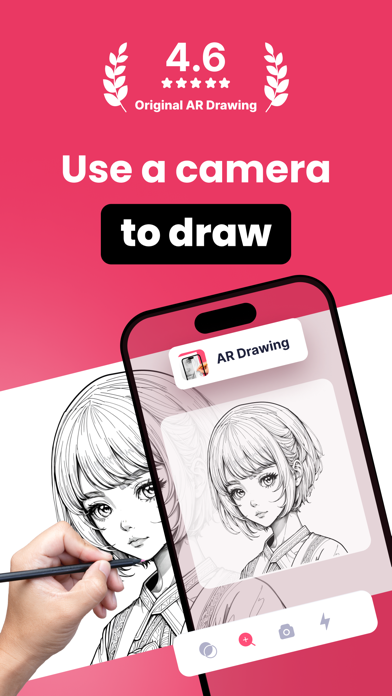
AR Drawing: Sketch & Paint is a mobile software solution designed for aspiring artists, hobbyists, and students who struggle with traditional proportions and perspective. By utilizing augmented reality technology, the tool projects digital templates onto any physical surface, allowing users to trace and sketch with precision. This platform solves the common barrier of the "blank canvas" by providing a guided framework for creating hand-drawn art.
Key Features
- AR Projection: Overlay digital images onto paper or walls using your device camera for accurate tracing.
- Image Conversion: Transform personal gallery photos into stencil-like outlines for sketching.
- Adjustable Opacity: Control the transparency of the digital overlay to see both the template and your physical strokes.
- Integrated Flashlight: Improve visibility in low-light environments while working on detailed projects.
- Recording Tool: Capture time-lapse videos of your creative process directly within the platform.
Use Cases
- Skill Development: Practice anatomy and complex geometry by tracing professional templates to build muscle memory.
- Custom Decor: Project patterns or calligraphy onto walls or large canvases for home DIY projects.
- Educational Projects: Assist students in creating accurate diagrams or portraits for school assignments.
- Personalized Gifts: Convert a family portrait into a sketchable outline to create a hand-drawn present.
Why Choose AR Drawing: Sketch & Paint
This tool bridges the gap between digital convenience and physical artistry. Unlike standard drawing apps, it encourages real-world practice by providing a stable architectural guide, ensuring that the benefits of digital templates translate into tangible paper-and-pencil skills.
Pros and Cons
Pros
- Simplifies complex sketching for beginners.
- Supports a wide range of categories and templates.
- Useful for recording social media content.
Cons
- Requires a stable tripod or stand for best results.
- Hardware battery drain due to continuous camera use.
Final Verdict
AR Drawing: Sketch & Paint is a practical utility for anyone looking to transition from digital inspiration to physical art. It provides a reliable technological assist that makes the learning curve of drawing significantly more manageable for users of all skill levels.
Ratings & Reviews
Please log in to write a review.
No reviews yet. Be the first to rate!