'%3e%3cpath%20fill='%230CCF60'%20d='M158.25%20175.542c0-29.271%2023.729-53%2053-53h131.375c29.271%200%2053%2023.729%2053%2053v131.023c0%2029.271-23.729%2053-53%2053H211.25c-29.271%200-53-23.729-53-53V175.542Z'/%3e%3cpath%20fill='%23D2DE75'%20d='M158.25%20452.518c0-29.271%2023.729-53%2053-53h131.375c29.271%200%2053%2023.729%2053%2053v131.024c0%2029.271-23.729%2053-53%2053H211.25c-29.271%200-53-23.729-53-53V452.518Z'/%3e%3cpath%20fill='%2315B66A'%20d='M434.875%20175.542c0-29.271%2023.729-53%2053-53H619.25c29.271%200%2053%2023.729%2053%2053v131.023c0%2029.271-23.729%2053-53%2053H487.875c-29.271%200-53-23.729-53-53V175.542Z'/%3e%3cpath%20fill='%23E7A95D'%20d='M434.875%20452.518c0-29.271%2023.729-53%2053-53H619.25c29.271%200%2053%2023.729%2053%2053v131.024c0%2029.271-23.729%2053-53%2053H487.875c-29.271%200-53-23.729-53-53V452.518Z'/%3e%3cpath%20fill='url(%23b)'%20d='M728.088%20123.584C586.142%2039.806%209.186-194.997%204.001%20342.299c-.08%208.242%206.658%2015.349%2014.9%2015.322l81.72-.262c8.736-.028%2015.536-8.148%2015.058-16.87-31.398-572.572%20754.324-133.144%20612.409-216.905Z'/%3e%3c/g%3e%3cdefs%3e%3clinearGradient%20id='b'%20x1='34.575'%20x2='673.419'%20y1='229.473'%20y2='-93.138'%20gradientUnits='userSpaceOnUse'%3e%3cstop%20stop-color='%2328E77B'/%3e%3cstop%20offset='1'%20stop-color='%2315B66A'/%3e%3c/linearGradient%3e%3cfilter%20id='a'%20width='749.251'%20height='644.542'%20x='0'%20y='0'%20color-interpolation-filters='sRGB'%20filterUnits='userSpaceOnUse'%3e%3cfeFlood%20flood-opacity='0'%20result='BackgroundImageFix'/%3e%3cfeColorMatrix%20in='SourceAlpha'%20result='hardAlpha'%20values='0%200%200%200%200%200%200%200%200%200%200%200%200%200%200%200%200%200%20127%200'/%3e%3cfeOffset%20dy='4'/%3e%3cfeGaussianBlur%20stdDeviation='2'/%3e%3cfeComposite%20in2='hardAlpha'%20operator='out'/%3e%3cfeColorMatrix%20values='0%200%200%200%200%200%200%200%200%200%200%200%200%200%200%200%200%200%200.25%200'/%3e%3cfeBlend%20in2='BackgroundImageFix'%20result='effect1_dropShadow_23_251'/%3e%3cfeBlend%20in='SourceGraphic'%20in2='effect1_dropShadow_23_251'%20result='shape'/%3e%3c/filter%3e%3c/defs%3e%3c/svg%3e)



About Bose
Learn more about this application's features and capabilities.
The Bose app is a sophisticated management tool designed for users who own the brand’s ecosystem of smart speakers, soundbars, and headphones. This software solves the complexity of modern audio setups by providing a centralized interface to control hardware settings, manage Bluetooth connections, and customize sound profiles. It is built for listeners who want to maximize the performance of their premium audio equipment through a streamlined, digital platform.
Key Features
- Unified Device Management: Connect and switch between multiple Bluetooth-enabled products from a single dashboard.
- Adjustable Noise Cancellation: Fine-tune the level of ambient sound transparency for compatible headphone models.
- Custom EQ Settings: Personalize audio output by adjusting bass, mid-range, and treble levels to suit specific genres.
- Simple Setup Guides: Access step-by-step instructions to connect new hardware to local Wi-Fi networks and voice assistants.
- Software Updates: Receive and install the latest firmware directly to devices to improve stability and add new functionality.
Use Cases
- Home Entertainment: Synchronize a soundbar and smart speakers to create a cohesive multi-room audio experience.
- Remote Work: Adjust noise cancellation levels on headphones to eliminate office distractions while remaining aware of surroundings.
- Personalized Listening: Save specific equalizer presets for different activities, such as high-energy workouts or relaxed podcast listening.
- Source Management: Quickly toggle between a laptop during work hours and a smartphone for personal calls without manual pairing.
Why Choose Bose
Utilizing this platform ensures that your high-end audio hardware remains current and fully optimized. The tool bridges the gap between physical hardware and digital convenience, offering benefits like precise acoustic control and effortless firmware management that a standard Bluetooth menu cannot provide.
Pros and Cons
Pros
- Intuitive user interface with clear navigation paths.
- Reliable firmware delivery for hardware longevity.
- Deep customization options for noise-canceling settings.
Cons
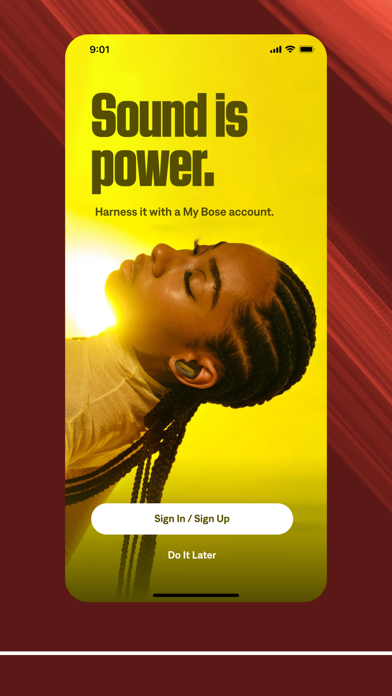
- Requires account creation for most management features.
- Occasional pairing delays during initial device discovery.
Final Verdict
The Bose app is a functional companion that enhances the utility of the brand's premium audio products. It provides a stable and practical way to manage complex settings, ensuring a better return on investment for high-quality sound equipment.
Ratings & Reviews
Please log in to write a review.
No reviews yet. Be the first to rate!