'%3e%3cpath%20fill='%230CCF60'%20d='M158.25%20175.542c0-29.271%2023.729-53%2053-53h131.375c29.271%200%2053%2023.729%2053%2053v131.023c0%2029.271-23.729%2053-53%2053H211.25c-29.271%200-53-23.729-53-53V175.542Z'/%3e%3cpath%20fill='%23D2DE75'%20d='M158.25%20452.518c0-29.271%2023.729-53%2053-53h131.375c29.271%200%2053%2023.729%2053%2053v131.024c0%2029.271-23.729%2053-53%2053H211.25c-29.271%200-53-23.729-53-53V452.518Z'/%3e%3cpath%20fill='%2315B66A'%20d='M434.875%20175.542c0-29.271%2023.729-53%2053-53H619.25c29.271%200%2053%2023.729%2053%2053v131.023c0%2029.271-23.729%2053-53%2053H487.875c-29.271%200-53-23.729-53-53V175.542Z'/%3e%3cpath%20fill='%23E7A95D'%20d='M434.875%20452.518c0-29.271%2023.729-53%2053-53H619.25c29.271%200%2053%2023.729%2053%2053v131.024c0%2029.271-23.729%2053-53%2053H487.875c-29.271%200-53-23.729-53-53V452.518Z'/%3e%3cpath%20fill='url(%23b)'%20d='M728.088%20123.584C586.142%2039.806%209.186-194.997%204.001%20342.299c-.08%208.242%206.658%2015.349%2014.9%2015.322l81.72-.262c8.736-.028%2015.536-8.148%2015.058-16.87-31.398-572.572%20754.324-133.144%20612.409-216.905Z'/%3e%3c/g%3e%3cdefs%3e%3clinearGradient%20id='b'%20x1='34.575'%20x2='673.419'%20y1='229.473'%20y2='-93.138'%20gradientUnits='userSpaceOnUse'%3e%3cstop%20stop-color='%2328E77B'/%3e%3cstop%20offset='1'%20stop-color='%2315B66A'/%3e%3c/linearGradient%3e%3cfilter%20id='a'%20width='749.251'%20height='644.542'%20x='0'%20y='0'%20color-interpolation-filters='sRGB'%20filterUnits='userSpaceOnUse'%3e%3cfeFlood%20flood-opacity='0'%20result='BackgroundImageFix'/%3e%3cfeColorMatrix%20in='SourceAlpha'%20result='hardAlpha'%20values='0%200%200%200%200%200%200%200%200%200%200%200%200%200%200%200%200%200%20127%200'/%3e%3cfeOffset%20dy='4'/%3e%3cfeGaussianBlur%20stdDeviation='2'/%3e%3cfeComposite%20in2='hardAlpha'%20operator='out'/%3e%3cfeColorMatrix%20values='0%200%200%200%200%200%200%200%200%200%200%200%200%200%200%200%200%200%200.25%200'/%3e%3cfeBlend%20in2='BackgroundImageFix'%20result='effect1_dropShadow_23_251'/%3e%3cfeBlend%20in='SourceGraphic'%20in2='effect1_dropShadow_23_251'%20result='shape'/%3e%3c/filter%3e%3c/defs%3e%3c/svg%3e)


About Cursoor AI - Assistant Guide
Learn more about this application's features and capabilities.
Cursoor AI Assistant Guide is a specialized educational software designed for developers and tech enthusiasts who want to master the capabilities of modern AI-powered code editors. The platform serves as a comprehensive instructional tool, bridging the gap between basic coding knowledge and advanced AI-assisted development. By providing structured walkthroughs and expert tips, it helps users solve the problem of steep learning curves associated with transitioning to AI-first integrated development environments.
Key Features
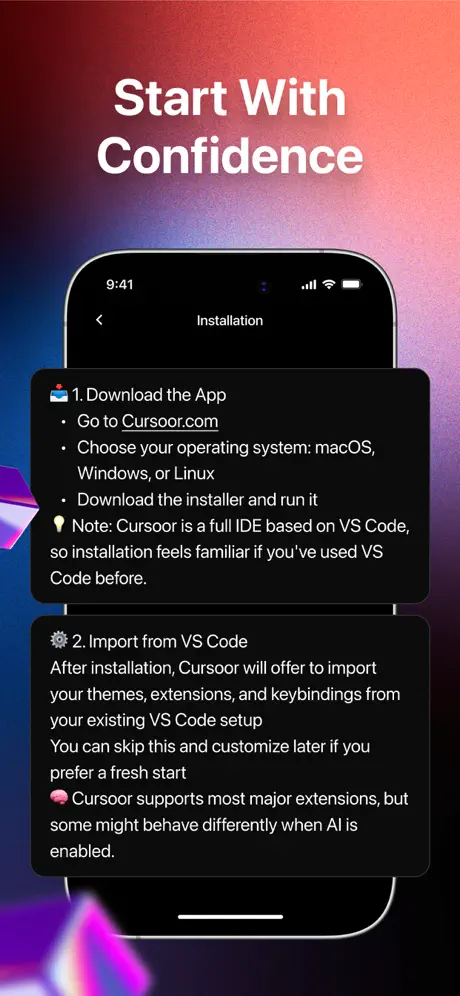
- Comprehensive Setup Guides: Access step-by-step instructions for installing and configuring AI development environments on macOS, Windows, and Linux.
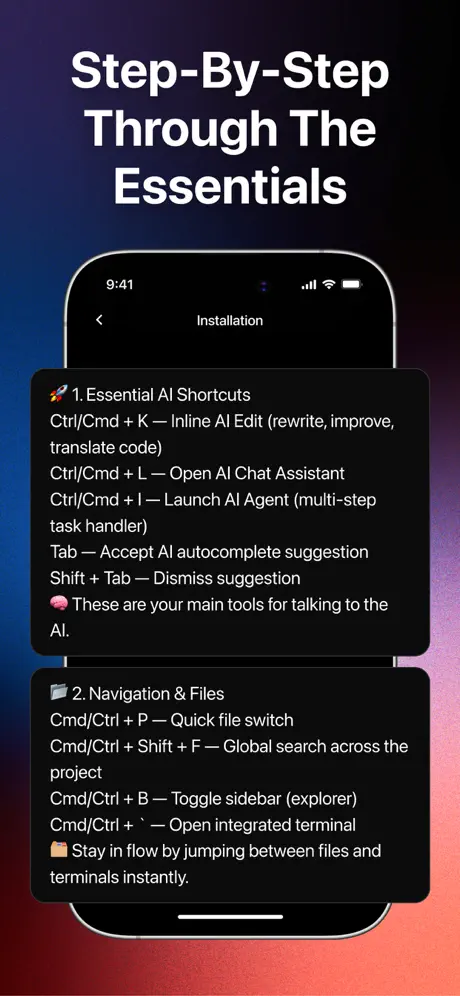
- Shortcut Directory: A dedicated reference for all essential hotkeys, including terminal commands and AI-driven inline editing triggers.
- Advanced Prompt Library: Learn how to write effective natural language instructions to generate high-quality code and minimize errors.
- Visual Learning Aids: Detailed screenshots and labeled examples that clarify complex features like AI autocomplete and debugging agents.
- Privacy & Security Education: Detailed modules explaining how to manage privacy modes and handle sensitive data within AI tools.
Use Cases
- Onboarding Junior Developers: Use the guide to quickly train new team members on the latest AI-assisted coding workflows.
- Optimizing Workflow Speed: Reference the shortcut library to memorize key commands that reduce reliance on manual mouse navigation.
- Debugging Assistance: Follow troubleshooting protocols to resolve common errors using AI-powered diagnostic features.
- Project Planning: Utilize the prompting guides to structure complex multi-file application architectures from scratch.
Why Choose Cursoor AI Assistant Guide
This software provides a centralized, easy-to-navigate knowledge base that saves users hours of manual research. While many AI tools have fragmented documentation, this platform consolidates everything from basic installation to elite-level agentic behavior into one interface. The primary benefit is a significant boost in productivity, allowing developers to act more as architects rather than manual encoders.
Pros and Cons
Pros
- Organized structure suitable for both beginners and experienced coders.
- Focuses on practical, actionable advice rather than theoretical fluff.
- Regular updates reflect the latest changes in AI coding technology.
Cons
- Requires an active subscription to access the full catalog of advanced lessons.
- The interface is primarily text and image-based without built-in code execution.
Final Verdict
Cursoor AI Assistant Guide is a valuable companion for anyone serious about integrating artificial intelligence into their daily programming routine. It offers a balanced mix of basic configuration help and advanced strategic insights, making it a reliable resource for modern software development.
Ratings & Reviews
Please log in to write a review.
No reviews yet. Be the first to rate!