'%3e%3cpath%20fill='%230CCF60'%20d='M158.25%20175.542c0-29.271%2023.729-53%2053-53h131.375c29.271%200%2053%2023.729%2053%2053v131.023c0%2029.271-23.729%2053-53%2053H211.25c-29.271%200-53-23.729-53-53V175.542Z'/%3e%3cpath%20fill='%23D2DE75'%20d='M158.25%20452.518c0-29.271%2023.729-53%2053-53h131.375c29.271%200%2053%2023.729%2053%2053v131.024c0%2029.271-23.729%2053-53%2053H211.25c-29.271%200-53-23.729-53-53V452.518Z'/%3e%3cpath%20fill='%2315B66A'%20d='M434.875%20175.542c0-29.271%2023.729-53%2053-53H619.25c29.271%200%2053%2023.729%2053%2053v131.023c0%2029.271-23.729%2053-53%2053H487.875c-29.271%200-53-23.729-53-53V175.542Z'/%3e%3cpath%20fill='%23E7A95D'%20d='M434.875%20452.518c0-29.271%2023.729-53%2053-53H619.25c29.271%200%2053%2023.729%2053%2053v131.024c0%2029.271-23.729%2053-53%2053H487.875c-29.271%200-53-23.729-53-53V452.518Z'/%3e%3cpath%20fill='url(%23b)'%20d='M728.088%20123.584C586.142%2039.806%209.186-194.997%204.001%20342.299c-.08%208.242%206.658%2015.349%2014.9%2015.322l81.72-.262c8.736-.028%2015.536-8.148%2015.058-16.87-31.398-572.572%20754.324-133.144%20612.409-216.905Z'/%3e%3c/g%3e%3cdefs%3e%3clinearGradient%20id='b'%20x1='34.575'%20x2='673.419'%20y1='229.473'%20y2='-93.138'%20gradientUnits='userSpaceOnUse'%3e%3cstop%20stop-color='%2328E77B'/%3e%3cstop%20offset='1'%20stop-color='%2315B66A'/%3e%3c/linearGradient%3e%3cfilter%20id='a'%20width='749.251'%20height='644.542'%20x='0'%20y='0'%20color-interpolation-filters='sRGB'%20filterUnits='userSpaceOnUse'%3e%3cfeFlood%20flood-opacity='0'%20result='BackgroundImageFix'/%3e%3cfeColorMatrix%20in='SourceAlpha'%20result='hardAlpha'%20values='0%200%200%200%200%200%200%200%200%200%200%200%200%200%200%200%200%200%20127%200'/%3e%3cfeOffset%20dy='4'/%3e%3cfeGaussianBlur%20stdDeviation='2'/%3e%3cfeComposite%20in2='hardAlpha'%20operator='out'/%3e%3cfeColorMatrix%20values='0%200%200%200%200%200%200%200%200%200%200%200%200%200%200%200%200%200%200.25%200'/%3e%3cfeBlend%20in2='BackgroundImageFix'%20result='effect1_dropShadow_23_251'/%3e%3cfeBlend%20in='SourceGraphic'%20in2='effect1_dropShadow_23_251'%20result='shape'/%3e%3c/filter%3e%3c/defs%3e%3c/svg%3e)




About Microsoft Teams
Learn more about this application's features and capabilities.
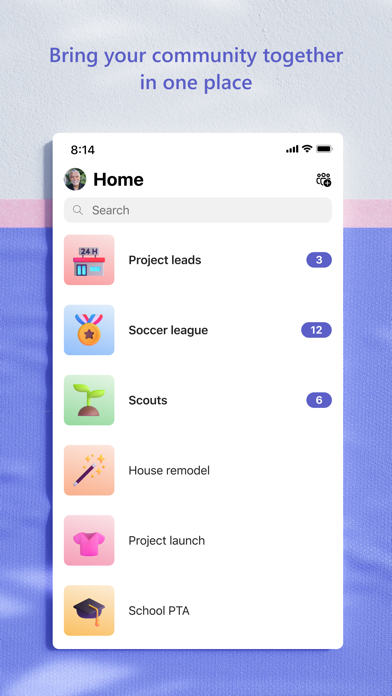
Microsoft Teams is a comprehensive communication and collaboration platform designed to unify remote and office-based teams within a single digital workspace. This software addresses the challenges of fragmented workflows by integrating chat, video conferencing, and file storage into one interface. It is built for professionals, educators, and organizations seeking to streamline project management and internal communications through a secure and scalable environment.
Key Features
- Unified Communication: Access persistent chat, high-definition video meetings, and audio calls within a single tool.
- File Collaboration: Edit and share documents in real-time using integrated office productivity applications.
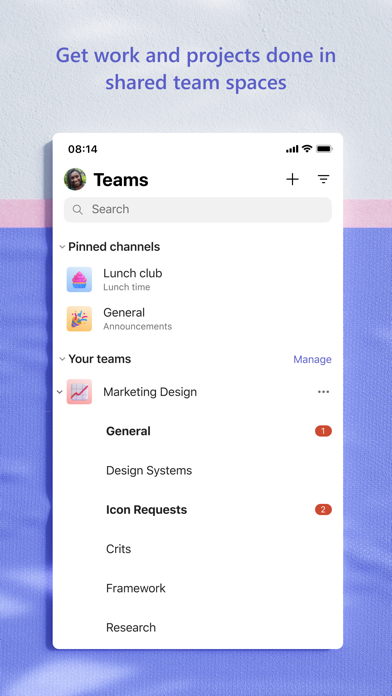
- Channels and Teams: Organize workflows by creating specific spaces for departments, projects, or topics.
- Screen Sharing: Present slide decks or demonstrate technical processes during live meetings with interactive tools.
- App Integration: Connect third-party project management and utility software to centralize organizational tasks.
Use Cases
- Remote Project Management: Coordinate tasks and deadlines with distributed team members through dedicated channels.
- Virtual Classrooms: Facilitate online learning with structured meeting environments, hand-raising features, and breakout rooms.
- Enterprise Webinars: Host large-scale presentations for internal announcements or external client demonstrations.
- Cross-Departmental Sync: Break down silos by allowing different business units to share resources in a shared digital environment.
Why Choose Microsoft Teams
This platform offers a significant benefit for organizations already utilizing a broader software ecosystem, as it provides native synchronization across documents and calendars. As a professional tool, it focuses on security and administrative control, ensuring that sensitive corporate data remains protected while maintaining high levels of accessibility for authorized users.
Pros and Cons
Pros
- Seamless integration with widely used enterprise productivity suites.
- High-level data encryption and administrative security settings.
- Robust version history for collaborative document editing.
Cons
- Initial configuration and permission settings can be complex for small teams.
- Significant system resource usage during high-definition video calls.
Final Verdict
Microsoft Teams is a powerful solution for organizations that require a structured and secure communication hub. While it has a learning curve for new users, its extensive feature set makes it an indispensable tool for modern professional collaboration.
Ratings & Reviews
Please log in to write a review.
No reviews yet. Be the first to rate!