'%3e%3cpath%20fill='%230CCF60'%20d='M158.25%20175.542c0-29.271%2023.729-53%2053-53h131.375c29.271%200%2053%2023.729%2053%2053v131.023c0%2029.271-23.729%2053-53%2053H211.25c-29.271%200-53-23.729-53-53V175.542Z'/%3e%3cpath%20fill='%23D2DE75'%20d='M158.25%20452.518c0-29.271%2023.729-53%2053-53h131.375c29.271%200%2053%2023.729%2053%2053v131.024c0%2029.271-23.729%2053-53%2053H211.25c-29.271%200-53-23.729-53-53V452.518Z'/%3e%3cpath%20fill='%2315B66A'%20d='M434.875%20175.542c0-29.271%2023.729-53%2053-53H619.25c29.271%200%2053%2023.729%2053%2053v131.023c0%2029.271-23.729%2053-53%2053H487.875c-29.271%200-53-23.729-53-53V175.542Z'/%3e%3cpath%20fill='%23E7A95D'%20d='M434.875%20452.518c0-29.271%2023.729-53%2053-53H619.25c29.271%200%2053%2023.729%2053%2053v131.024c0%2029.271-23.729%2053-53%2053H487.875c-29.271%200-53-23.729-53-53V452.518Z'/%3e%3cpath%20fill='url(%23b)'%20d='M728.088%20123.584C586.142%2039.806%209.186-194.997%204.001%20342.299c-.08%208.242%206.658%2015.349%2014.9%2015.322l81.72-.262c8.736-.028%2015.536-8.148%2015.058-16.87-31.398-572.572%20754.324-133.144%20612.409-216.905Z'/%3e%3c/g%3e%3cdefs%3e%3clinearGradient%20id='b'%20x1='34.575'%20x2='673.419'%20y1='229.473'%20y2='-93.138'%20gradientUnits='userSpaceOnUse'%3e%3cstop%20stop-color='%2328E77B'/%3e%3cstop%20offset='1'%20stop-color='%2315B66A'/%3e%3c/linearGradient%3e%3cfilter%20id='a'%20width='749.251'%20height='644.542'%20x='0'%20y='0'%20color-interpolation-filters='sRGB'%20filterUnits='userSpaceOnUse'%3e%3cfeFlood%20flood-opacity='0'%20result='BackgroundImageFix'/%3e%3cfeColorMatrix%20in='SourceAlpha'%20result='hardAlpha'%20values='0%200%200%200%200%200%200%200%200%200%200%200%200%200%200%200%200%200%20127%200'/%3e%3cfeOffset%20dy='4'/%3e%3cfeGaussianBlur%20stdDeviation='2'/%3e%3cfeComposite%20in2='hardAlpha'%20operator='out'/%3e%3cfeColorMatrix%20values='0%200%200%200%200%200%200%200%200%200%200%200%200%200%200%200%200%200%200.25%200'/%3e%3cfeBlend%20in2='BackgroundImageFix'%20result='effect1_dropShadow_23_251'/%3e%3cfeBlend%20in='SourceGraphic'%20in2='effect1_dropShadow_23_251'%20result='shape'/%3e%3c/filter%3e%3c/defs%3e%3c/svg%3e)


About Mipa-
Learn more about this application's features and capabilities.
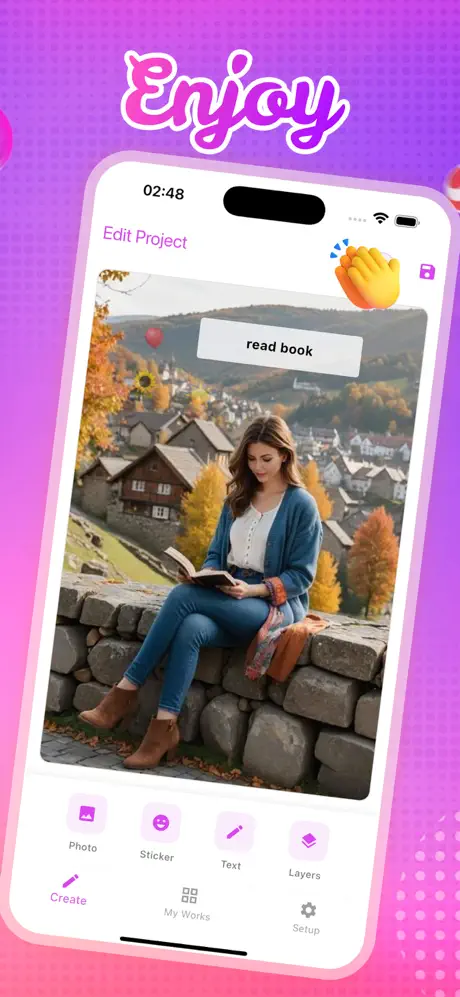
Mipa is a creative photo editing platform designed for iPhone and iPad users who want to transform standard images into professional-grade collages. This mobile tool solves the problem of limited design flexibility in default photo apps by offering a comprehensive digital studio for personalized visual storytelling. Whether you are a social media enthusiast or a digital scrapbooker, the software provides the necessary features to create artistic compositions without requiring advanced graphic design skills.
Key Features
- Expansive Sticker Library: Access hundreds of trending stickers, icons, and decorative embellishments to match any visual theme.
- Advanced Typography Tools: Customize your projects with various text styles and fonts to add meaningful messages to your photos.
- Intuitive Project Management: Neatly organize your creations and save works-in-progress to revisit and edit your designs at any time.
- Flexible Grid Layouts: Move beyond standard templates with tools that allow for personalized and stand-out collage arrangements.
- High-Resolution Export: Save your visual masterpieces in high quality, ready for sharing or printing.
Use Cases
- Social Media Content: Design eye-catching posts for platforms like Instagram or Pinterest to boost audience engagement.
- Digital Scrapbooking: Preserve your memories by combining travel or event photos into organized, artistic layouts.
- Personalized Greetings: Create custom digital cards or announcements for birthdays and special occasions.
- Project Planning: Use the collage tool to build mood boards or visual references for creative projects.
Why Choose Mipa
This platform stands out for its balance of professional-level capabilities and a user-friendly interface. Choosing the Mipa software allows you to bypass complex desktop editors while still achieving high-quality results. Its lightweight design ensures smooth performance on iOS devices, making it an efficient benefit for creators who need to edit and share content on the go.
Pros and Cons
Pros
- Simple and sleek user interface accessible to beginners.
- Robust selection of creative assets like stickers and fonts.
- Capability to save and manage multiple ongoing projects.
Cons
- Currently optimized primarily for iPhone and iPad users.
- Limited advanced photo retouching tools compared to full-scale editors.
Final Verdict
Mipa is a powerful yet intuitive tool for anyone looking to elevate their mobile photo editing. It successfully bridges the gap between simple grids and professional design, making it an essential platform for modern visual creators.
Ratings & Reviews
Please log in to write a review.
No reviews yet. Be the first to rate!