'%3e%3cpath%20fill='%230CCF60'%20d='M158.25%20175.542c0-29.271%2023.729-53%2053-53h131.375c29.271%200%2053%2023.729%2053%2053v131.023c0%2029.271-23.729%2053-53%2053H211.25c-29.271%200-53-23.729-53-53V175.542Z'/%3e%3cpath%20fill='%23D2DE75'%20d='M158.25%20452.518c0-29.271%2023.729-53%2053-53h131.375c29.271%200%2053%2023.729%2053%2053v131.024c0%2029.271-23.729%2053-53%2053H211.25c-29.271%200-53-23.729-53-53V452.518Z'/%3e%3cpath%20fill='%2315B66A'%20d='M434.875%20175.542c0-29.271%2023.729-53%2053-53H619.25c29.271%200%2053%2023.729%2053%2053v131.023c0%2029.271-23.729%2053-53%2053H487.875c-29.271%200-53-23.729-53-53V175.542Z'/%3e%3cpath%20fill='%23E7A95D'%20d='M434.875%20452.518c0-29.271%2023.729-53%2053-53H619.25c29.271%200%2053%2023.729%2053%2053v131.024c0%2029.271-23.729%2053-53%2053H487.875c-29.271%200-53-23.729-53-53V452.518Z'/%3e%3cpath%20fill='url(%23b)'%20d='M728.088%20123.584C586.142%2039.806%209.186-194.997%204.001%20342.299c-.08%208.242%206.658%2015.349%2014.9%2015.322l81.72-.262c8.736-.028%2015.536-8.148%2015.058-16.87-31.398-572.572%20754.324-133.144%20612.409-216.905Z'/%3e%3c/g%3e%3cdefs%3e%3clinearGradient%20id='b'%20x1='34.575'%20x2='673.419'%20y1='229.473'%20y2='-93.138'%20gradientUnits='userSpaceOnUse'%3e%3cstop%20stop-color='%2328E77B'/%3e%3cstop%20offset='1'%20stop-color='%2315B66A'/%3e%3c/linearGradient%3e%3cfilter%20id='a'%20width='749.251'%20height='644.542'%20x='0'%20y='0'%20color-interpolation-filters='sRGB'%20filterUnits='userSpaceOnUse'%3e%3cfeFlood%20flood-opacity='0'%20result='BackgroundImageFix'/%3e%3cfeColorMatrix%20in='SourceAlpha'%20result='hardAlpha'%20values='0%200%200%200%200%200%200%200%200%200%200%200%200%200%200%200%200%200%20127%200'/%3e%3cfeOffset%20dy='4'/%3e%3cfeGaussianBlur%20stdDeviation='2'/%3e%3cfeComposite%20in2='hardAlpha'%20operator='out'/%3e%3cfeColorMatrix%20values='0%200%200%200%200%200%200%200%200%200%200%200%200%200%200%200%200%200%200.25%200'/%3e%3cfeBlend%20in2='BackgroundImageFix'%20result='effect1_dropShadow_23_251'/%3e%3cfeBlend%20in='SourceGraphic'%20in2='effect1_dropShadow_23_251'%20result='shape'/%3e%3c/filter%3e%3c/defs%3e%3c/svg%3e)





About MX Player App - App Store
Learn more about this application's features and capabilities.
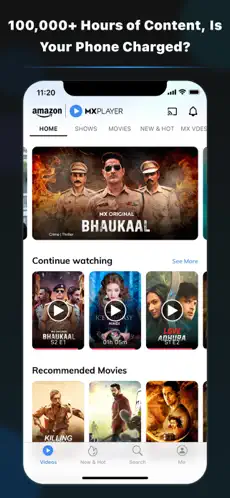
MX Player is a versatile media playback software designed for users who require a high-performance tool to manage both local files and streaming content. It addresses the common issue of codec incompatibility by supporting nearly every video and audio format, making it a reliable platform for mobile entertainment. Whether you are a cinephile with a large local library or a viewer seeking trending web series, this application provides a centralized solution for high-quality playback.
Key Features
- Hardware Acceleration: Utilizes advanced HW+ decoders to improve playback stability and battery efficiency.
- Multi-Core Decoding: Optimized for multi-core processors, ensuring smooth performance during high-bitrate video streaming.
- Subtitle Gestures: Allows users to scroll forward or backward to move subtitle text and change text size with simple pinch gestures.
- Privacy Folder: Provides a secure space to hide and lock personal video files away from the main gallery.
- Wide Format Support: Handles diverse file extensions including MKV, MP4, AVI, and DVD subtitle formats without external plugins.
Use Cases
- Offline Commuting: Watch high-definition movies stored on your device storage during flights or areas with poor connectivity.
- Language Learning: Use the precise subtitle controls and dual-audio support to switch between languages and follow dialogue closely.
- Content Streaming: Access a vast library of original shows and music videos directly through the integrated online interface.
- File Management: Organize local media folders and secure sensitive content using the built-in file protection features.
Why Choose MX Player
This platform stands out because it balances professional-grade playback controls with an intuitive interface. As a tool, it prioritizes performance, ensuring that even 4K or 8K files run without lag. It is a practical choice for those who want a single app to bridge the gap between their personal media collection and modern streaming services.
Pros and Cons
Pros
- Exceptional codec support for seamless file compatibility.
- Intuitive gesture controls for volume, brightness, and seeking.
- Smooth playback on various hardware configurations.
Cons
- The free version contains frequent banner and interstitial ads.
- Online content availability may vary by geographical region.
Ratings & Reviews
Please log in to write a review.
No reviews yet. Be the first to rate!