'%3e%3cpath%20fill='%230CCF60'%20d='M158.25%20175.542c0-29.271%2023.729-53%2053-53h131.375c29.271%200%2053%2023.729%2053%2053v131.023c0%2029.271-23.729%2053-53%2053H211.25c-29.271%200-53-23.729-53-53V175.542Z'/%3e%3cpath%20fill='%23D2DE75'%20d='M158.25%20452.518c0-29.271%2023.729-53%2053-53h131.375c29.271%200%2053%2023.729%2053%2053v131.024c0%2029.271-23.729%2053-53%2053H211.25c-29.271%200-53-23.729-53-53V452.518Z'/%3e%3cpath%20fill='%2315B66A'%20d='M434.875%20175.542c0-29.271%2023.729-53%2053-53H619.25c29.271%200%2053%2023.729%2053%2053v131.023c0%2029.271-23.729%2053-53%2053H487.875c-29.271%200-53-23.729-53-53V175.542Z'/%3e%3cpath%20fill='%23E7A95D'%20d='M434.875%20452.518c0-29.271%2023.729-53%2053-53H619.25c29.271%200%2053%2023.729%2053%2053v131.024c0%2029.271-23.729%2053-53%2053H487.875c-29.271%200-53-23.729-53-53V452.518Z'/%3e%3cpath%20fill='url(%23b)'%20d='M728.088%20123.584C586.142%2039.806%209.186-194.997%204.001%20342.299c-.08%208.242%206.658%2015.349%2014.9%2015.322l81.72-.262c8.736-.028%2015.536-8.148%2015.058-16.87-31.398-572.572%20754.324-133.144%20612.409-216.905Z'/%3e%3c/g%3e%3cdefs%3e%3clinearGradient%20id='b'%20x1='34.575'%20x2='673.419'%20y1='229.473'%20y2='-93.138'%20gradientUnits='userSpaceOnUse'%3e%3cstop%20stop-color='%2328E77B'/%3e%3cstop%20offset='1'%20stop-color='%2315B66A'/%3e%3c/linearGradient%3e%3cfilter%20id='a'%20width='749.251'%20height='644.542'%20x='0'%20y='0'%20color-interpolation-filters='sRGB'%20filterUnits='userSpaceOnUse'%3e%3cfeFlood%20flood-opacity='0'%20result='BackgroundImageFix'/%3e%3cfeColorMatrix%20in='SourceAlpha'%20result='hardAlpha'%20values='0%200%200%200%200%200%200%200%200%200%200%200%200%200%200%200%200%200%20127%200'/%3e%3cfeOffset%20dy='4'/%3e%3cfeGaussianBlur%20stdDeviation='2'/%3e%3cfeComposite%20in2='hardAlpha'%20operator='out'/%3e%3cfeColorMatrix%20values='0%200%200%200%200%200%200%200%200%200%200%200%200%200%200%200%200%200%200.25%200'/%3e%3cfeBlend%20in2='BackgroundImageFix'%20result='effect1_dropShadow_23_251'/%3e%3cfeBlend%20in='SourceGraphic'%20in2='effect1_dropShadow_23_251'%20result='shape'/%3e%3c/filter%3e%3c/defs%3e%3c/svg%3e)



About TouchRetouch
Learn more about this application's features and capabilities.
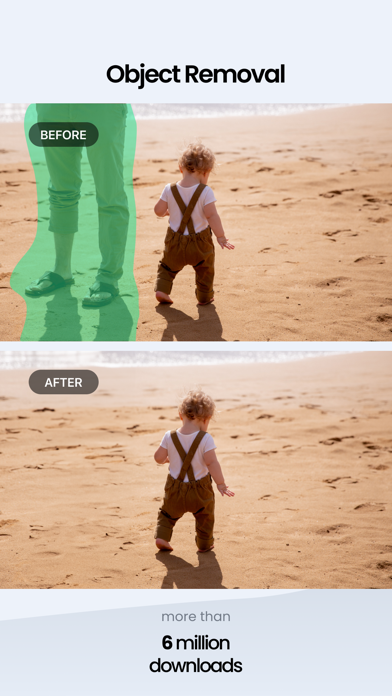
TouchRetouch is a specialized photo editing software designed to remove unwanted elements from images with professional precision. It serves photographers, social media influencers, and casual users who need to clean up distractions like power lines, skin blemishes, or background objects without using complex desktop tools. By leveraging intelligent algorithms, this platform solves the problem of ruined shots by allowing users to perform seamless object removal directly on their mobile devices.
Key Features
- Object Removal Tool: Brush over or loop around items to erase them from the composition instantly.
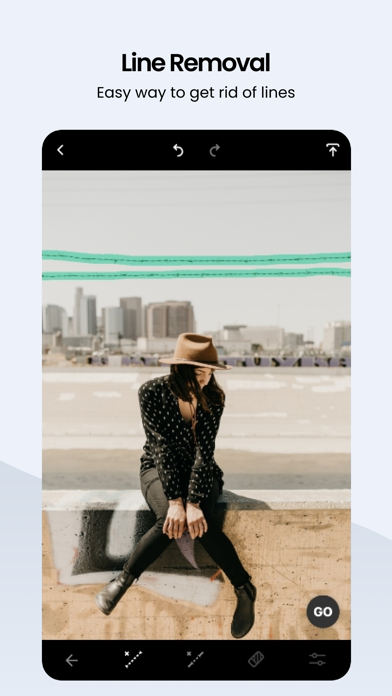
- Line Remover: Specialized algorithm for detecting and removing straight or curved lines like cables and fences.
- Quick Repair: One-touch blemish remover for perfecting portraits and skin textures.
- Clone Stamp: Manual tool for duplicating pixels to cover gaps or blend textures realistically.
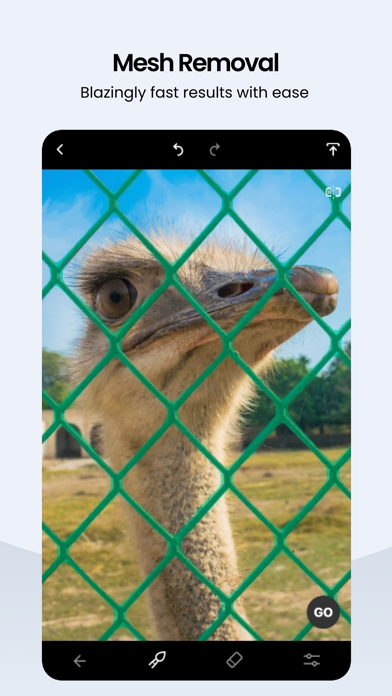
- Mesh Detection: Advanced feature designed to identify and eliminate grid-like patterns such as metal fences.
Use Cases
- Travel Photography: Removing tourists or stray objects from landscape photos to keep the focus on the scenery.
- Portrait Retouching: Clearing temporary skin imperfections or stray hairs for a polished look.
- Real Estate: Cleaning up interior or exterior shots by removing distracting wires or wall marks.
- Product Imaging: Eliminating dust spots or reflections to create clean assets for e-commerce.
Why Choose TouchRetouch
Choosing this tool provides a streamlined workflow that replaces the need for heavy desktop editing suites. The software focuses exclusively on retouching, ensuring that the benefits of its specialized algorithms outweigh the general healing brushes found in multipurpose apps. It delivers high-resolution exports while maintaining the integrity of the original image data.
Pros and Cons
Pros
- Precise edge detection for complex backgrounds.
- Non-destructive editing capabilities.
- Intuitive interface requiring no prior editing experience.
Cons
- Limited to retouching tasks rather than full color grading.
- Complex patterns may require manual clone stamping for best results.
Final Verdict
TouchRetouch is an essential utility for anyone looking to refine their mobile photography through efficient object removal. It balances simplicity with powerful technical performance, making it a reliable choice for achieving clean, professional-grade images.
Ratings & Reviews
Please log in to write a review.
No reviews yet. Be the first to rate!