'%3e%3cpath%20fill='%230CCF60'%20d='M158.25%20175.542c0-29.271%2023.729-53%2053-53h131.375c29.271%200%2053%2023.729%2053%2053v131.023c0%2029.271-23.729%2053-53%2053H211.25c-29.271%200-53-23.729-53-53V175.542Z'/%3e%3cpath%20fill='%23D2DE75'%20d='M158.25%20452.518c0-29.271%2023.729-53%2053-53h131.375c29.271%200%2053%2023.729%2053%2053v131.024c0%2029.271-23.729%2053-53%2053H211.25c-29.271%200-53-23.729-53-53V452.518Z'/%3e%3cpath%20fill='%2315B66A'%20d='M434.875%20175.542c0-29.271%2023.729-53%2053-53H619.25c29.271%200%2053%2023.729%2053%2053v131.023c0%2029.271-23.729%2053-53%2053H487.875c-29.271%200-53-23.729-53-53V175.542Z'/%3e%3cpath%20fill='%23E7A95D'%20d='M434.875%20452.518c0-29.271%2023.729-53%2053-53H619.25c29.271%200%2053%2023.729%2053%2053v131.024c0%2029.271-23.729%2053-53%2053H487.875c-29.271%200-53-23.729-53-53V452.518Z'/%3e%3cpath%20fill='url(%23b)'%20d='M728.088%20123.584C586.142%2039.806%209.186-194.997%204.001%20342.299c-.08%208.242%206.658%2015.349%2014.9%2015.322l81.72-.262c8.736-.028%2015.536-8.148%2015.058-16.87-31.398-572.572%20754.324-133.144%20612.409-216.905Z'/%3e%3c/g%3e%3cdefs%3e%3clinearGradient%20id='b'%20x1='34.575'%20x2='673.419'%20y1='229.473'%20y2='-93.138'%20gradientUnits='userSpaceOnUse'%3e%3cstop%20stop-color='%2328E77B'/%3e%3cstop%20offset='1'%20stop-color='%2315B66A'/%3e%3c/linearGradient%3e%3cfilter%20id='a'%20width='749.251'%20height='644.542'%20x='0'%20y='0'%20color-interpolation-filters='sRGB'%20filterUnits='userSpaceOnUse'%3e%3cfeFlood%20flood-opacity='0'%20result='BackgroundImageFix'/%3e%3cfeColorMatrix%20in='SourceAlpha'%20result='hardAlpha'%20values='0%200%200%200%200%200%200%200%200%200%200%200%200%200%200%200%200%200%20127%200'/%3e%3cfeOffset%20dy='4'/%3e%3cfeGaussianBlur%20stdDeviation='2'/%3e%3cfeComposite%20in2='hardAlpha'%20operator='out'/%3e%3cfeColorMatrix%20values='0%200%200%200%200%200%200%200%200%200%200%200%200%200%200%200%200%200%200.25%200'/%3e%3cfeBlend%20in2='BackgroundImageFix'%20result='effect1_dropShadow_23_251'/%3e%3cfeBlend%20in='SourceGraphic'%20in2='effect1_dropShadow_23_251'%20result='shape'/%3e%3c/filter%3e%3c/defs%3e%3c/svg%3e)





About Vector & SVG Maker - Assembly
Learn more about this application's features and capabilities.
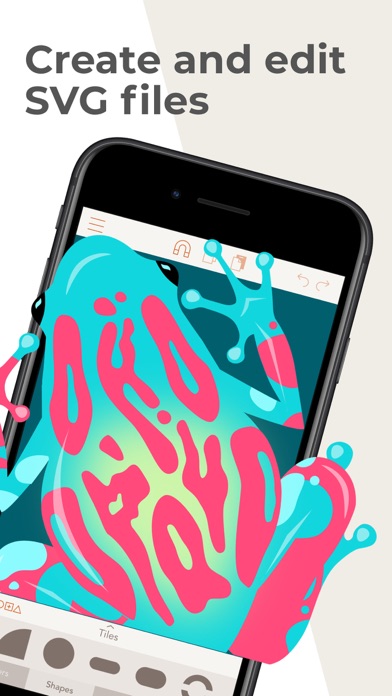
Assembly is a powerful yet approachable vector design tool developed by Pixite Inc., specifically engineered for creating high-quality logos, icons, and illustrations on mobile devices. This website and app platform serve as a bridge for creators who need professional-grade output without the steep learning curve associated with traditional desktop software. By utilizing a unique shape-building workflow, it solves the problem of complex node manipulation, allowing users to assemble intricate designs from a library of pre-made vector primitives.
Key Features
- Shape-Building Engine: Combine, cut out, and intersect over 1,000 professional shapes to create complex vector graphics quickly.
- Precision Point Editing: Utilize industry-standard Bezier curves and a powerful point editing system for fine-tuning custom illustrations.
- Advanced Text Engine: Access 25 versatile hand-selected fonts or import your own custom typography to integrate professional text into designs.
- High-Resolution Export: Output finished work in scalable vector formats like SVG and PDF, or rasterize up to 8192 x 8192 resolution for PNG and JPG.
- Intelligent Snapping: A smart grid and snapping system that ensures pixel-perfect alignment and professional proportions during the design process.
- Project Synchronization: Seamlessly sync projects across devices via iCloud, allowing for a mobile-first workflow that transitions between iPhone and iPad.
Use Cases
- Logo and Brand Identity: Entrepreneurs use the tool to draft and finalize professional logos that can scale from business cards to billboards.
- Web Iconography: UI/UX designers utilize the platform to create custom SVG icons and assets that remain crisp on any screen resolution.
- Digital Stickers and Social Assets: Content creators build and save custom sticker packs and social media graphics to enhance their online presence.
- Prototyping and Sketching: Graphic designers use the software as a digital sketchbook to rough out concepts rapidly before moving to desktop suites.
Why Choose Assembly
Choosing this software allows you to mobilize your creativity with a "Procreate-like" simplicity applied to the world of vector art. Assembly stands out because it eliminates the bloat of traditional design suites, providing only the essential tools needed for high-impact visual work. The primary benefit of the platform is its efficiency; it enables both beginners and experts to produce professional results in half the time it takes using conventional manual path-drawing methods.
Pros and Cons
Pros
- Extremely intuitive interface that makes vector design accessible to non-experts.
- Massive library of shapes and stickers to jumpstart the creative process.
- High-quality SVG export for perfect compatibility with desktop design apps.
Cons
- Advanced features like gradients and masking are limited compared to high-end desktop editors.
- Subscription-based "Pro" model is required to unlock the full library of shapes and tools.
Final Verdict
Assembly is a revolutionary platform for mobile-based vector design, successfully combining ease of use with professional-grade output. It is an indispensable tool for anyone looking to create clean, scalable graphics on the go without sacrificing quality or precision.
Ratings & Reviews
Please log in to write a review.
No reviews yet. Be the first to rate!