'%3e%3cpath%20fill='%230CCF60'%20d='M158.25%20175.542c0-29.271%2023.729-53%2053-53h131.375c29.271%200%2053%2023.729%2053%2053v131.023c0%2029.271-23.729%2053-53%2053H211.25c-29.271%200-53-23.729-53-53V175.542Z'/%3e%3cpath%20fill='%23D2DE75'%20d='M158.25%20452.518c0-29.271%2023.729-53%2053-53h131.375c29.271%200%2053%2023.729%2053%2053v131.024c0%2029.271-23.729%2053-53%2053H211.25c-29.271%200-53-23.729-53-53V452.518Z'/%3e%3cpath%20fill='%2315B66A'%20d='M434.875%20175.542c0-29.271%2023.729-53%2053-53H619.25c29.271%200%2053%2023.729%2053%2053v131.023c0%2029.271-23.729%2053-53%2053H487.875c-29.271%200-53-23.729-53-53V175.542Z'/%3e%3cpath%20fill='%23E7A95D'%20d='M434.875%20452.518c0-29.271%2023.729-53%2053-53H619.25c29.271%200%2053%2023.729%2053%2053v131.024c0%2029.271-23.729%2053-53%2053H487.875c-29.271%200-53-23.729-53-53V452.518Z'/%3e%3cpath%20fill='url(%23b)'%20d='M728.088%20123.584C586.142%2039.806%209.186-194.997%204.001%20342.299c-.08%208.242%206.658%2015.349%2014.9%2015.322l81.72-.262c8.736-.028%2015.536-8.148%2015.058-16.87-31.398-572.572%20754.324-133.144%20612.409-216.905Z'/%3e%3c/g%3e%3cdefs%3e%3clinearGradient%20id='b'%20x1='34.575'%20x2='673.419'%20y1='229.473'%20y2='-93.138'%20gradientUnits='userSpaceOnUse'%3e%3cstop%20stop-color='%2328E77B'/%3e%3cstop%20offset='1'%20stop-color='%2315B66A'/%3e%3c/linearGradient%3e%3cfilter%20id='a'%20width='749.251'%20height='644.542'%20x='0'%20y='0'%20color-interpolation-filters='sRGB'%20filterUnits='userSpaceOnUse'%3e%3cfeFlood%20flood-opacity='0'%20result='BackgroundImageFix'/%3e%3cfeColorMatrix%20in='SourceAlpha'%20result='hardAlpha'%20values='0%200%200%200%200%200%200%200%200%200%200%200%200%200%200%200%200%200%20127%200'/%3e%3cfeOffset%20dy='4'/%3e%3cfeGaussianBlur%20stdDeviation='2'/%3e%3cfeComposite%20in2='hardAlpha'%20operator='out'/%3e%3cfeColorMatrix%20values='0%200%200%200%200%200%200%200%200%200%200%200%200%200%200%200%200%200%200.25%200'/%3e%3cfeBlend%20in2='BackgroundImageFix'%20result='effect1_dropShadow_23_251'/%3e%3cfeBlend%20in='SourceGraphic'%20in2='effect1_dropShadow_23_251'%20result='shape'/%3e%3c/filter%3e%3c/defs%3e%3c/svg%3e)


About Document Scanner - PDF Creator
Learn more about this application's features and capabilities.
Document Scanner is a high-performance mobile application designed to transform your smartphone into a portable office tool. This software is built for professionals, students, and freelancers who need to digitize physical paperwork instantly, solving the common problem of bulky hardware and inaccessible physical archives. By leveraging advanced image processing, the platform ensures that every scan is crisp, legible, and ready for professional distribution.
Key Features
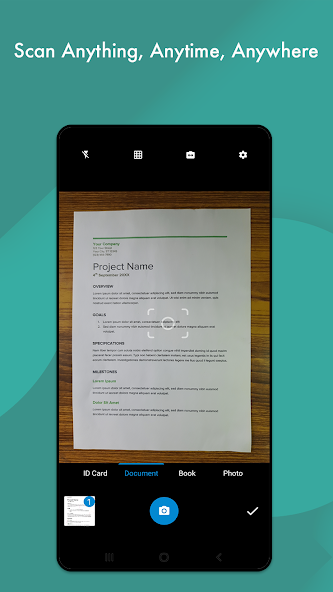
- Smart Edge Detection: Automatically identifies document boundaries to ensure precise cropping and perspective correction.
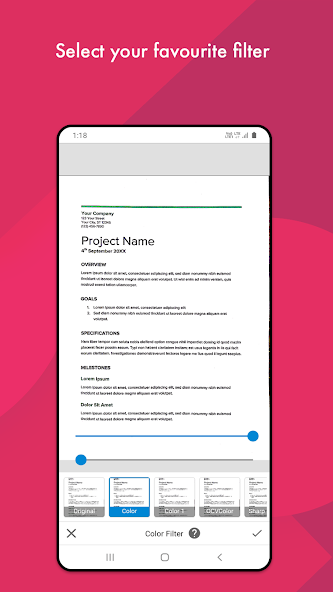
- Advanced Image Enhancement: Provides multiple filters to improve readability by adjusting brightness, contrast, and color saturation.
- OCR Technology: Integrated Optical Character Recognition allows users to extract and search text within their scanned documents.
- Batch Scanning Mode: Rapidly capture multiple pages to create comprehensive PDF files in a single session.
- PDF and JPG Export: Save and share files in industry-standard formats for universal compatibility.
Use Cases
- Business Administration: Scan invoices, receipts, and contracts on the go to streamline expense reporting and record-keeping.
- Academic Research: Capture book pages, handwritten notes, and whiteboards to organize study materials digitally.
- Personal Archiving: Digitize important identity cards, certificates, and tax documents for secure mobile access.
- Remote Collaboration: Sign physical documents and send them via email or cloud storage without needing a desktop scanner.
Why Choose Document Scanner
This tool stands out by balancing powerful processing with a lightweight interface. Choosing Document Scanner means opting for a reliable utility that prioritizes speed and clarity, ensuring that your digital files meet professional standards. The benefits include reduced physical clutter and the ability to handle urgent paperwork tasks regardless of your location.
Pros and Cons
Pros
- High-quality image rendering with minimal noise.
- Efficient organization system for managing saved files.
- Fast processing speeds even for multi-page documents.
Cons
- OCR accuracy may vary depending on the quality of handwriting.
- Free version may include advertisements during the workflow.
Final Verdict
Document Scanner is an essential utility for anyone requiring a mobile solution for high-quality document digitization. It successfully combines ease of use with professional-grade features, making it a dependable choice for managing digital workflows.
Ratings & Reviews
Please log in to write a review.
No reviews yet. Be the first to rate!