'%3e%3cpath%20fill='%230CCF60'%20d='M158.25%20175.542c0-29.271%2023.729-53%2053-53h131.375c29.271%200%2053%2023.729%2053%2053v131.023c0%2029.271-23.729%2053-53%2053H211.25c-29.271%200-53-23.729-53-53V175.542Z'/%3e%3cpath%20fill='%23D2DE75'%20d='M158.25%20452.518c0-29.271%2023.729-53%2053-53h131.375c29.271%200%2053%2023.729%2053%2053v131.024c0%2029.271-23.729%2053-53%2053H211.25c-29.271%200-53-23.729-53-53V452.518Z'/%3e%3cpath%20fill='%2315B66A'%20d='M434.875%20175.542c0-29.271%2023.729-53%2053-53H619.25c29.271%200%2053%2023.729%2053%2053v131.023c0%2029.271-23.729%2053-53%2053H487.875c-29.271%200-53-23.729-53-53V175.542Z'/%3e%3cpath%20fill='%23E7A95D'%20d='M434.875%20452.518c0-29.271%2023.729-53%2053-53H619.25c29.271%200%2053%2023.729%2053%2053v131.024c0%2029.271-23.729%2053-53%2053H487.875c-29.271%200-53-23.729-53-53V452.518Z'/%3e%3cpath%20fill='url(%23b)'%20d='M728.088%20123.584C586.142%2039.806%209.186-194.997%204.001%20342.299c-.08%208.242%206.658%2015.349%2014.9%2015.322l81.72-.262c8.736-.028%2015.536-8.148%2015.058-16.87-31.398-572.572%20754.324-133.144%20612.409-216.905Z'/%3e%3c/g%3e%3cdefs%3e%3clinearGradient%20id='b'%20x1='34.575'%20x2='673.419'%20y1='229.473'%20y2='-93.138'%20gradientUnits='userSpaceOnUse'%3e%3cstop%20stop-color='%2328E77B'/%3e%3cstop%20offset='1'%20stop-color='%2315B66A'/%3e%3c/linearGradient%3e%3cfilter%20id='a'%20width='749.251'%20height='644.542'%20x='0'%20y='0'%20color-interpolation-filters='sRGB'%20filterUnits='userSpaceOnUse'%3e%3cfeFlood%20flood-opacity='0'%20result='BackgroundImageFix'/%3e%3cfeColorMatrix%20in='SourceAlpha'%20result='hardAlpha'%20values='0%200%200%200%200%200%200%200%200%200%200%200%200%200%200%200%200%200%20127%200'/%3e%3cfeOffset%20dy='4'/%3e%3cfeGaussianBlur%20stdDeviation='2'/%3e%3cfeComposite%20in2='hardAlpha'%20operator='out'/%3e%3cfeColorMatrix%20values='0%200%200%200%200%200%200%200%200%200%200%200%200%200%200%200%200%200%200.25%200'/%3e%3cfeBlend%20in2='BackgroundImageFix'%20result='effect1_dropShadow_23_251'/%3e%3cfeBlend%20in='SourceGraphic'%20in2='effect1_dropShadow_23_251'%20result='shape'/%3e%3c/filter%3e%3c/defs%3e%3c/svg%3e)

About Root Explorer
Learn more about this application's features and capabilities.
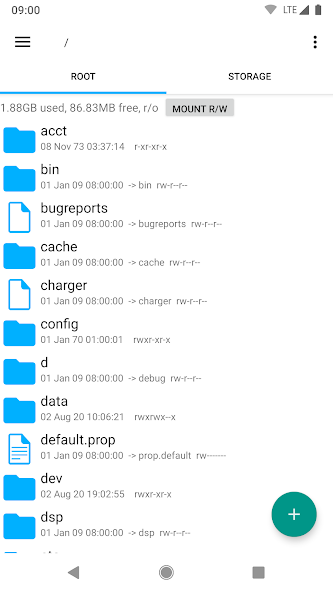
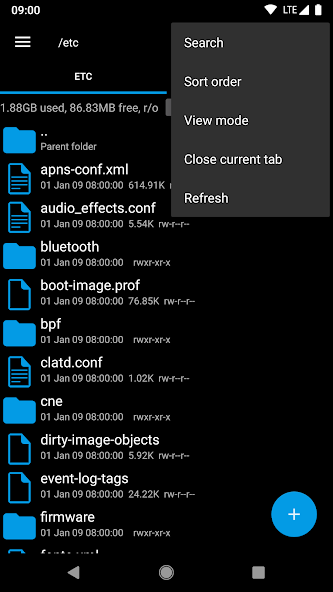
Root Explorer is the definitive file manager for power users and Android enthusiasts who require deep access to their device's file system. Developed by Speed Software, this utility is designed for users with rooted devices who need to modify system-level files, manage app data, and bypass standard permission restrictions. It solves the limitation of stock file explorers by providing a high-performance interface for viewing hidden directories and executing administrative tasks safely and efficiently.
Core Features of Root Explorer
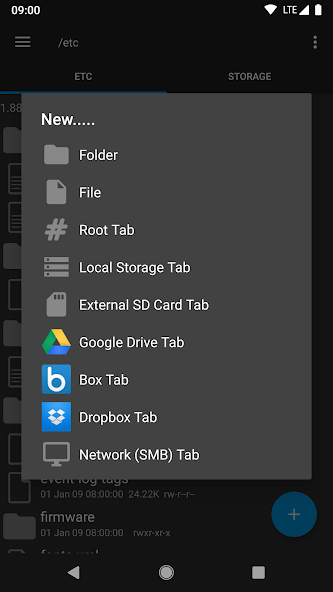
- Multiple Tab Support: Navigate between different directories simultaneously using a tabbed interface for faster file management.
- Cloud and Network Integration: Built-in support for Google Drive, Dropbox, Box, and SMB/CIFS for seamless file transfers across platforms.
- Built-in Viewers and Editors: Includes a text editor, database viewer, and zip/rar extractor to handle various file types without third-party software.
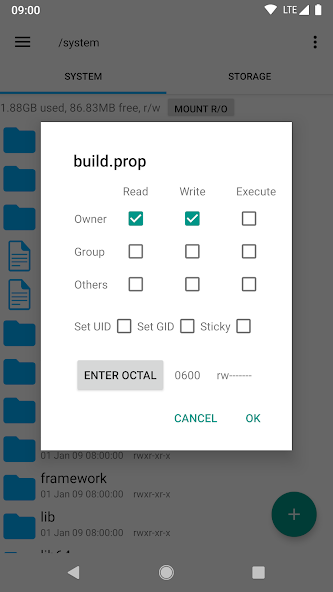
- Permissions Management: Easily modify owner/group associations and change file permissions (RW/RO) for system-level configuration.
Practical Use Cases
- System Customization: Editing the build.prop file or other system configuration files to enhance device performance or UI.
- App Data Backup: Manually accessing and backing up private application data that is typically hidden from the user.
- Storage Optimization: Identifying and removing orphaned files or large system logs to reclaim internal storage space.
- Script Execution: Running Linux shell scripts directly within the tool to automate complex maintenance tasks.
Why Choose Root Explorer
This software remains a industry standard due to its stability and long-term reliability. Unlike many modern alternatives that are cluttered with advertisements or unnecessary bloatware, this tool maintains a clean, functional design focused entirely on performance. It provides the technical depth required by developers while remaining intuitive enough for experienced hobbyists.
Pros and Cons
Pros
- Extremely lightweight and fast execution.
- Comprehensive support for various archive formats.
- Reliable background operations for long file transfers.
Cons
- Requires root access for its primary functionality.
- The user interface follows a legacy design aesthetic.
Final Verdict
Root Explorer is an essential tool for any rooted Android user who demands absolute control over their hardware. It balances advanced technical capabilities with a straightforward workflow, making it a reliable choice for system-level file manipulation.
Ratings & Reviews
Please log in to write a review.
No reviews yet. Be the first to rate!