'%3e%3cpath%20fill='%230CCF60'%20d='M158.25%20175.542c0-29.271%2023.729-53%2053-53h131.375c29.271%200%2053%2023.729%2053%2053v131.023c0%2029.271-23.729%2053-53%2053H211.25c-29.271%200-53-23.729-53-53V175.542Z'/%3e%3cpath%20fill='%23D2DE75'%20d='M158.25%20452.518c0-29.271%2023.729-53%2053-53h131.375c29.271%200%2053%2023.729%2053%2053v131.024c0%2029.271-23.729%2053-53%2053H211.25c-29.271%200-53-23.729-53-53V452.518Z'/%3e%3cpath%20fill='%2315B66A'%20d='M434.875%20175.542c0-29.271%2023.729-53%2053-53H619.25c29.271%200%2053%2023.729%2053%2053v131.023c0%2029.271-23.729%2053-53%2053H487.875c-29.271%200-53-23.729-53-53V175.542Z'/%3e%3cpath%20fill='%23E7A95D'%20d='M434.875%20452.518c0-29.271%2023.729-53%2053-53H619.25c29.271%200%2053%2023.729%2053%2053v131.024c0%2029.271-23.729%2053-53%2053H487.875c-29.271%200-53-23.729-53-53V452.518Z'/%3e%3cpath%20fill='url(%23b)'%20d='M728.088%20123.584C586.142%2039.806%209.186-194.997%204.001%20342.299c-.08%208.242%206.658%2015.349%2014.9%2015.322l81.72-.262c8.736-.028%2015.536-8.148%2015.058-16.87-31.398-572.572%20754.324-133.144%20612.409-216.905Z'/%3e%3c/g%3e%3cdefs%3e%3clinearGradient%20id='b'%20x1='34.575'%20x2='673.419'%20y1='229.473'%20y2='-93.138'%20gradientUnits='userSpaceOnUse'%3e%3cstop%20stop-color='%2328E77B'/%3e%3cstop%20offset='1'%20stop-color='%2315B66A'/%3e%3c/linearGradient%3e%3cfilter%20id='a'%20width='749.251'%20height='644.542'%20x='0'%20y='0'%20color-interpolation-filters='sRGB'%20filterUnits='userSpaceOnUse'%3e%3cfeFlood%20flood-opacity='0'%20result='BackgroundImageFix'/%3e%3cfeColorMatrix%20in='SourceAlpha'%20result='hardAlpha'%20values='0%200%200%200%200%200%200%200%200%200%200%200%200%200%200%200%200%200%20127%200'/%3e%3cfeOffset%20dy='4'/%3e%3cfeGaussianBlur%20stdDeviation='2'/%3e%3cfeComposite%20in2='hardAlpha'%20operator='out'/%3e%3cfeColorMatrix%20values='0%200%200%200%200%200%200%200%200%200%200%200%200%200%200%200%200%200%200.25%200'/%3e%3cfeBlend%20in2='BackgroundImageFix'%20result='effect1_dropShadow_23_251'/%3e%3cfeBlend%20in='SourceGraphic'%20in2='effect1_dropShadow_23_251'%20result='shape'/%3e%3c/filter%3e%3c/defs%3e%3c/svg%3e)


About Cx File Explorer
Learn more about this application's features and capabilities.
Streamline Your Storage with CX File Explorer
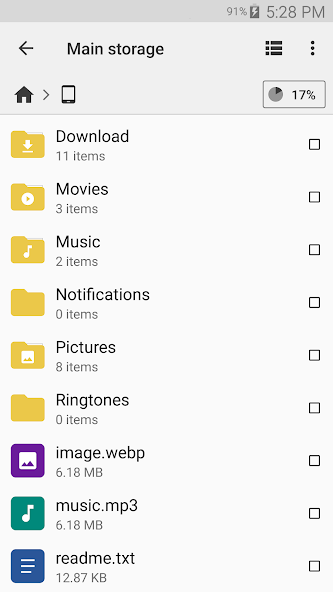
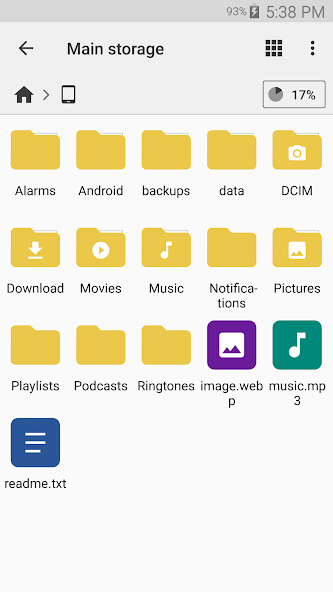
CX File Explorer is a robust file management application designed for Android users who require a clean, organized, and efficient way to navigate their device storage. This tool solves the common problem of cluttered directories and hidden files by providing a visual breakdown of your storage consumption. Whether you are managing local downloads, SD card content, or cloud-based files, CX File Explorer serves as a centralized platform to browse, move, and organize your data with a high-performance interface.
Key Features
- Visual Storage Analysis: View a detailed dashboard that categorizes files by type and identifies large items consuming space.
- Cloud Integration: Access and manage files on platforms like Google Drive, Dropbox, and OneDrive directly within the app.
- Network Access: Connect to remote storage via FTP, FTPS, SFTP, and SMB, allowing for seamless file transfers between PC and mobile.
- App Management: Monitor installed applications, backup APKs, and uninstall unused software to reclaim memory.
- Recycle Bin: Safeguard against accidental deletions by utilizing a temporary storage area for discarded files.
Use Cases
- Freeing Up Space: Quickly identify and delete cached files or large video files that are bloating internal storage.
- Remote File Transfer: Transfer documents from a desktop computer to a tablet over a local Wi-Fi network without cables.
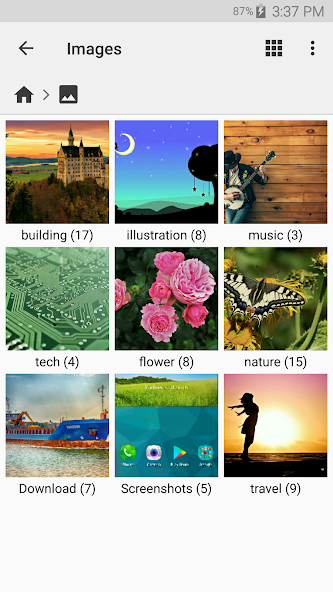
- Media Organization: Categorize thousands of photos and downloads into specific folders for faster retrieval.
- APK Backups: Save installers of specific app versions before updating to ensure you can revert if necessary.
Why Choose CX File Explorer
This software stands out because it balances advanced technical capabilities with a minimalist design. CX File Explorer provides the depth of a professional file manager without the intrusive advertisements or complex menus found in many competitors. It focuses on speed and reliability, making it a dependable choice for both casual users and IT professionals.
Pros and Cons
Pros
- Clean, ad-free user interface.
- Fast indexing of internal and external storage.
- Support for multiple network protocols.
- Built-in media player and text editor.
Cons
- Limited advanced root access features.
- Interface may feel too simple for power users seeking deep customization.
Final Verdict
CX File Explorer is an excellent, lightweight tool for anyone looking to take control of their digital files. It offers a perfect blend of local storage management and network connectivity, ensuring your data is always accessible and organized.
Ratings & Reviews
Please log in to write a review.
No reviews yet. Be the first to rate!