'%3e%3cpath%20fill='%230CCF60'%20d='M158.25%20175.542c0-29.271%2023.729-53%2053-53h131.375c29.271%200%2053%2023.729%2053%2053v131.023c0%2029.271-23.729%2053-53%2053H211.25c-29.271%200-53-23.729-53-53V175.542Z'/%3e%3cpath%20fill='%23D2DE75'%20d='M158.25%20452.518c0-29.271%2023.729-53%2053-53h131.375c29.271%200%2053%2023.729%2053%2053v131.024c0%2029.271-23.729%2053-53%2053H211.25c-29.271%200-53-23.729-53-53V452.518Z'/%3e%3cpath%20fill='%2315B66A'%20d='M434.875%20175.542c0-29.271%2023.729-53%2053-53H619.25c29.271%200%2053%2023.729%2053%2053v131.023c0%2029.271-23.729%2053-53%2053H487.875c-29.271%200-53-23.729-53-53V175.542Z'/%3e%3cpath%20fill='%23E7A95D'%20d='M434.875%20452.518c0-29.271%2023.729-53%2053-53H619.25c29.271%200%2053%2023.729%2053%2053v131.024c0%2029.271-23.729%2053-53%2053H487.875c-29.271%200-53-23.729-53-53V452.518Z'/%3e%3cpath%20fill='url(%23b)'%20d='M728.088%20123.584C586.142%2039.806%209.186-194.997%204.001%20342.299c-.08%208.242%206.658%2015.349%2014.9%2015.322l81.72-.262c8.736-.028%2015.536-8.148%2015.058-16.87-31.398-572.572%20754.324-133.144%20612.409-216.905Z'/%3e%3c/g%3e%3cdefs%3e%3clinearGradient%20id='b'%20x1='34.575'%20x2='673.419'%20y1='229.473'%20y2='-93.138'%20gradientUnits='userSpaceOnUse'%3e%3cstop%20stop-color='%2328E77B'/%3e%3cstop%20offset='1'%20stop-color='%2315B66A'/%3e%3c/linearGradient%3e%3cfilter%20id='a'%20width='749.251'%20height='644.542'%20x='0'%20y='0'%20color-interpolation-filters='sRGB'%20filterUnits='userSpaceOnUse'%3e%3cfeFlood%20flood-opacity='0'%20result='BackgroundImageFix'/%3e%3cfeColorMatrix%20in='SourceAlpha'%20result='hardAlpha'%20values='0%200%200%200%200%200%200%200%200%200%200%200%200%200%200%200%200%200%20127%200'/%3e%3cfeOffset%20dy='4'/%3e%3cfeGaussianBlur%20stdDeviation='2'/%3e%3cfeComposite%20in2='hardAlpha'%20operator='out'/%3e%3cfeColorMatrix%20values='0%200%200%200%200%200%200%200%200%200%200%200%200%200%200%200%200%200%200.25%200'/%3e%3cfeBlend%20in2='BackgroundImageFix'%20result='effect1_dropShadow_23_251'/%3e%3cfeBlend%20in='SourceGraphic'%20in2='effect1_dropShadow_23_251'%20result='shape'/%3e%3c/filter%3e%3c/defs%3e%3c/svg%3e)




About Link to Windows
Learn more about this application's features and capabilities.
Link to Windows is a productivity software developed by Microsoft that bridges the gap between your Android device and your PC. It is designed for professionals, students, and multitaskers who need to access mobile content without constantly switching between screens. By integrating your smartphone directly into the Windows environment, the tool solves the problem of workflow interruption and helps users stay focused on their primary workstation.
Key Features
- Real-Time Notifications: View and manage smartphone alerts directly on your PC desktop.
- Cross-Device Messaging: Send and receive SMS or MMS messages using your computer's keyboard and mouse.
- Photo Access: Instant access to the last 2,000 photos on your phone for quick dragging and dropping into PC applications.
- App Mirroring: Open and interact with your mobile apps on a larger screen without picking up your device.
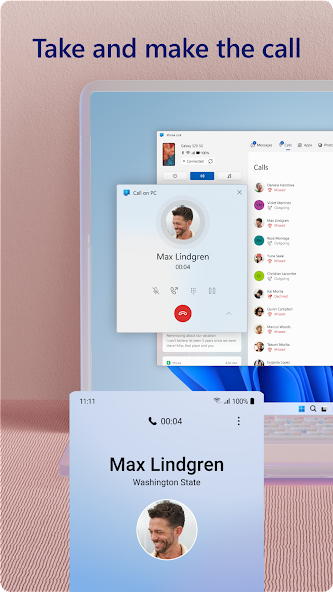
- Calls Management: Answer or initiate phone calls from your PC using the computer's speakers and microphone.
Use Cases
- Professional Productivity: Respond to urgent text messages and app notifications during meetings without looking at your phone.
- Content Creation: Quickly transfer mobile screenshots or camera photos into a document or presentation on your PC.
- Device Management: Monitor your phone’s battery life and connectivity status from the Windows taskbar.
- Text Efficiency: Use a full-sized keyboard to type long replies to mobile chat messages.
Why Choose Link to Windows
This platform offers a seamless ecosystem for users who rely on both Android and Windows for daily tasks. Unlike generic file-sharing tools, it provides a deep system-level integration that maintains focus and reduces the physical strain of managing multiple devices. It effectively turns your smartphone into an extension of your computer.
Pros and Cons
Pros
- High-speed synchronization of messages and notifications.
- Reduces distractions by keeping all digital communication in one place.
- Wireless connection after the initial setup.
Cons
- Requires a stable Wi-Fi connection for advanced features like screen mirroring.
- Some advanced functions are restricted to specific hardware manufacturers.
Final Verdict
Link to Windows is a highly efficient utility for anyone seeking to unify their mobile and desktop experiences. It provides a stable and practical solution for managing communication and media across platforms with minimal latency.
Ratings & Reviews
Please log in to write a review.
No reviews yet. Be the first to rate!