'%3e%3cpath%20fill='%230CCF60'%20d='M158.25%20175.542c0-29.271%2023.729-53%2053-53h131.375c29.271%200%2053%2023.729%2053%2053v131.023c0%2029.271-23.729%2053-53%2053H211.25c-29.271%200-53-23.729-53-53V175.542Z'/%3e%3cpath%20fill='%23D2DE75'%20d='M158.25%20452.518c0-29.271%2023.729-53%2053-53h131.375c29.271%200%2053%2023.729%2053%2053v131.024c0%2029.271-23.729%2053-53%2053H211.25c-29.271%200-53-23.729-53-53V452.518Z'/%3e%3cpath%20fill='%2315B66A'%20d='M434.875%20175.542c0-29.271%2023.729-53%2053-53H619.25c29.271%200%2053%2023.729%2053%2053v131.023c0%2029.271-23.729%2053-53%2053H487.875c-29.271%200-53-23.729-53-53V175.542Z'/%3e%3cpath%20fill='%23E7A95D'%20d='M434.875%20452.518c0-29.271%2023.729-53%2053-53H619.25c29.271%200%2053%2023.729%2053%2053v131.024c0%2029.271-23.729%2053-53%2053H487.875c-29.271%200-53-23.729-53-53V452.518Z'/%3e%3cpath%20fill='url(%23b)'%20d='M728.088%20123.584C586.142%2039.806%209.186-194.997%204.001%20342.299c-.08%208.242%206.658%2015.349%2014.9%2015.322l81.72-.262c8.736-.028%2015.536-8.148%2015.058-16.87-31.398-572.572%20754.324-133.144%20612.409-216.905Z'/%3e%3c/g%3e%3cdefs%3e%3clinearGradient%20id='b'%20x1='34.575'%20x2='673.419'%20y1='229.473'%20y2='-93.138'%20gradientUnits='userSpaceOnUse'%3e%3cstop%20stop-color='%2328E77B'/%3e%3cstop%20offset='1'%20stop-color='%2315B66A'/%3e%3c/linearGradient%3e%3cfilter%20id='a'%20width='749.251'%20height='644.542'%20x='0'%20y='0'%20color-interpolation-filters='sRGB'%20filterUnits='userSpaceOnUse'%3e%3cfeFlood%20flood-opacity='0'%20result='BackgroundImageFix'/%3e%3cfeColorMatrix%20in='SourceAlpha'%20result='hardAlpha'%20values='0%200%200%200%200%200%200%200%200%200%200%200%200%200%200%200%200%200%20127%200'/%3e%3cfeOffset%20dy='4'/%3e%3cfeGaussianBlur%20stdDeviation='2'/%3e%3cfeComposite%20in2='hardAlpha'%20operator='out'/%3e%3cfeColorMatrix%20values='0%200%200%200%200%200%200%200%200%200%200%200%200%200%200%200%200%200%200.25%200'/%3e%3cfeBlend%20in2='BackgroundImageFix'%20result='effect1_dropShadow_23_251'/%3e%3cfeBlend%20in='SourceGraphic'%20in2='effect1_dropShadow_23_251'%20result='shape'/%3e%3c/filter%3e%3c/defs%3e%3c/svg%3e)



About Prisma Art Effect Photo Editor
Learn more about this application's features and capabilities.
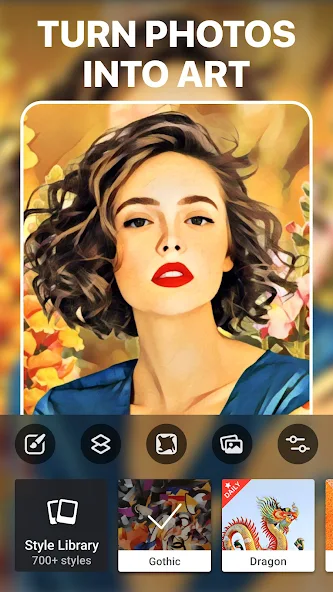
Prisma is an advanced AI-powered photo editor designed to transform standard digital images into striking works of art. By utilizing neural network technology and complex style transfer algorithms, this software solves the problem of generic, flat mobile filters by reinterpreting photos in the styles of legendary artists like Picasso, Van Gogh, and Dali. It is built for social media creators, digital artists, and casual users who want to elevate their visual content with professional-grade artistic flair.
Key Features
- Neural Style Transfer: Recreates images from scratch using AI to mimic authentic painting textures and brushstrokes.
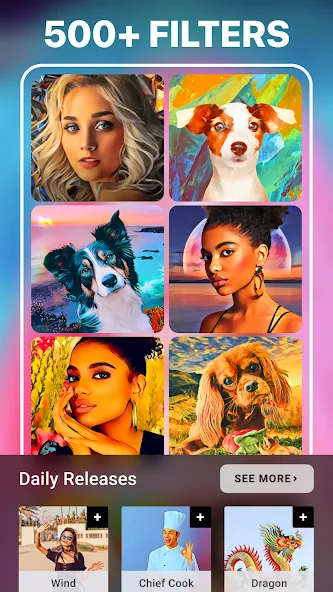
- Extensive Art Library: Access over 500 unique filters, with new artistic styles added to the platform every day.
- Portrait Segmentation: Apply effects selectively to the subject or the background to create depth and focus.
- Background Replacement: Swap out cluttered backgrounds for stylized templates or custom gallery images in one tap.
- Fine-Tuning Tools: Adjust exposure, contrast, and sharpness using professional-grade image enhancement sliders.
Use Cases
- Social Media Branding: Create a consistent, hand-painted aesthetic for Instagram feeds and TikTok profile pictures.
- Digital Gifts: Transform family portraits into digital canvases suitable for printing or personalized messaging.
- Visual Storytelling: Use the cartoon or sketch effects to turn travel photos into a cohesive digital storyboard.
- Portrait Enhancement: Isolate a subject from a busy background to make professional-looking headshots or creative selfies.
Why Choose Prisma
This tool stands out because it goes beyond simple overlays, using deep learning to analyze and reconstruct your images. It provides a legal and high-tech alternative to manual digital painting, offering a seamless user experience that bridges the gap between photography and fine art. The platform's commitment to daily updates ensures that users always have fresh creative assets at their disposal.
Pros and Cons
Pros
- High-quality artistic output that looks like real oil or acrylic paint.
- Intuitive interface that requires zero technical or artistic training.
- Robust selection of both classic and modern digital art styles.
Cons
- Some high-resolution processing requires a premium subscription.
- Complex AI rendering can take longer than traditional photo filters.
Final Verdict
Prisma remains a top-tier choice for anyone looking to add legitimate artistic value to their mobile photography. It is a powerful software solution that balances sophisticated technology with an easy-to-use interface for impressive results.
Ratings & Reviews
Please log in to write a review.
No reviews yet. Be the first to rate!