'%3e%3cpath%20fill='%230CCF60'%20d='M158.25%20175.542c0-29.271%2023.729-53%2053-53h131.375c29.271%200%2053%2023.729%2053%2053v131.023c0%2029.271-23.729%2053-53%2053H211.25c-29.271%200-53-23.729-53-53V175.542Z'/%3e%3cpath%20fill='%23D2DE75'%20d='M158.25%20452.518c0-29.271%2023.729-53%2053-53h131.375c29.271%200%2053%2023.729%2053%2053v131.024c0%2029.271-23.729%2053-53%2053H211.25c-29.271%200-53-23.729-53-53V452.518Z'/%3e%3cpath%20fill='%2315B66A'%20d='M434.875%20175.542c0-29.271%2023.729-53%2053-53H619.25c29.271%200%2053%2023.729%2053%2053v131.023c0%2029.271-23.729%2053-53%2053H487.875c-29.271%200-53-23.729-53-53V175.542Z'/%3e%3cpath%20fill='%23E7A95D'%20d='M434.875%20452.518c0-29.271%2023.729-53%2053-53H619.25c29.271%200%2053%2023.729%2053%2053v131.024c0%2029.271-23.729%2053-53%2053H487.875c-29.271%200-53-23.729-53-53V452.518Z'/%3e%3cpath%20fill='url(%23b)'%20d='M728.088%20123.584C586.142%2039.806%209.186-194.997%204.001%20342.299c-.08%208.242%206.658%2015.349%2014.9%2015.322l81.72-.262c8.736-.028%2015.536-8.148%2015.058-16.87-31.398-572.572%20754.324-133.144%20612.409-216.905Z'/%3e%3c/g%3e%3cdefs%3e%3clinearGradient%20id='b'%20x1='34.575'%20x2='673.419'%20y1='229.473'%20y2='-93.138'%20gradientUnits='userSpaceOnUse'%3e%3cstop%20stop-color='%2328E77B'/%3e%3cstop%20offset='1'%20stop-color='%2315B66A'/%3e%3c/linearGradient%3e%3cfilter%20id='a'%20width='749.251'%20height='644.542'%20x='0'%20y='0'%20color-interpolation-filters='sRGB'%20filterUnits='userSpaceOnUse'%3e%3cfeFlood%20flood-opacity='0'%20result='BackgroundImageFix'/%3e%3cfeColorMatrix%20in='SourceAlpha'%20result='hardAlpha'%20values='0%200%200%200%200%200%200%200%200%200%200%200%200%200%200%200%200%200%20127%200'/%3e%3cfeOffset%20dy='4'/%3e%3cfeGaussianBlur%20stdDeviation='2'/%3e%3cfeComposite%20in2='hardAlpha'%20operator='out'/%3e%3cfeColorMatrix%20values='0%200%200%200%200%200%200%200%200%200%200%200%200%200%200%200%200%200%200.25%200'/%3e%3cfeBlend%20in2='BackgroundImageFix'%20result='effect1_dropShadow_23_251'/%3e%3cfeBlend%20in='SourceGraphic'%20in2='effect1_dropShadow_23_251'%20result='shape'/%3e%3c/filter%3e%3c/defs%3e%3c/svg%3e)



About Explorer
Learn more about this application's features and capabilities.
Streamlined File Management with Explorer
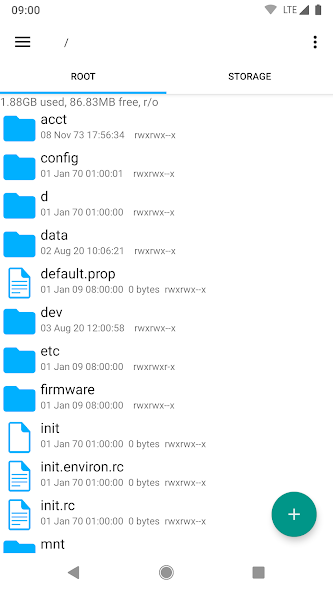
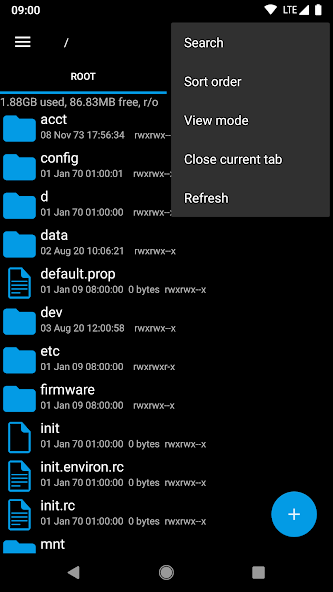
Explorer is a lightweight yet powerful file management tool designed for users who require high-performance navigation within their Android device's storage. Developed by Speed Software, the creator of Root Explorer, this app solves the problem of cluttered directories and slow file access by providing a clean, tabbed interface. Whether you are a casual user organizing photos or a power user managing system files, Explorer offers the speed and reliability necessary to handle complex directory structures without unnecessary overhead.
Key Features of Explorer
- Multi-Tab Navigation: Effortlessly switch between different folders and storage locations using a intuitive tabbed interface.
- Cloud Storage Integration: Seamlessly access and manage files stored on Google Drive, Dropbox, and Box directly within the software.
- Archive Support: Built-in tools to create and extract ZIP and tar/gzip files, as well as extract RAR archives.
- Network Access: Connect to remote servers via SMB (Windows Network), FTP, and WebDAV protocols for unified file handling.
- Root Access Capability: While it functions as a standard manager, it can access the entire Android file system on rooted devices.
Use Cases
- Remote File Transfer: Moving documents from a local smartphone directory to a corporate SMB server or personal cloud account.
- Media Organization: Batch renaming, moving, and sorting large libraries of photos and videos across internal and SD card storage.
- Resource Extraction: Decompressing downloaded software assets or zipped attachments received via email.
- System Optimization: Identifying and removing large, unused files to free up device memory.
Why Choose Explorer
Explorer stands out because it prioritizes utility over visual fluff. It provides a stable platform for managing local and network data without the intrusive advertisements or "bloatware" features common in many free file managers. Its small footprint makes it an ideal tool for older hardware and modern flagship devices alike.
Pros and Cons
Pros
- Extremely fast and responsive user interface.
- Supports multiple cloud and network protocols in one view.
- Clean, ad-free experience that respects user privacy.
Cons
- The minimalist design may feel dated to users preferring modern Material Design aesthetics.
- Advanced features like root access require technical knowledge to use safely.
Final Verdict
Explorer is a highly efficient file management solution that balances advanced functionality with a simple, no-nonsense interface. It is an excellent choice for users who value speed and technical versatility over visual trends.
Ratings & Reviews
Please log in to write a review.
No reviews yet. Be the first to rate!