'%3e%3cpath%20fill='%230CCF60'%20d='M158.25%20175.542c0-29.271%2023.729-53%2053-53h131.375c29.271%200%2053%2023.729%2053%2053v131.023c0%2029.271-23.729%2053-53%2053H211.25c-29.271%200-53-23.729-53-53V175.542Z'/%3e%3cpath%20fill='%23D2DE75'%20d='M158.25%20452.518c0-29.271%2023.729-53%2053-53h131.375c29.271%200%2053%2023.729%2053%2053v131.024c0%2029.271-23.729%2053-53%2053H211.25c-29.271%200-53-23.729-53-53V452.518Z'/%3e%3cpath%20fill='%2315B66A'%20d='M434.875%20175.542c0-29.271%2023.729-53%2053-53H619.25c29.271%200%2053%2023.729%2053%2053v131.023c0%2029.271-23.729%2053-53%2053H487.875c-29.271%200-53-23.729-53-53V175.542Z'/%3e%3cpath%20fill='%23E7A95D'%20d='M434.875%20452.518c0-29.271%2023.729-53%2053-53H619.25c29.271%200%2053%2023.729%2053%2053v131.024c0%2029.271-23.729%2053-53%2053H487.875c-29.271%200-53-23.729-53-53V452.518Z'/%3e%3cpath%20fill='url(%23b)'%20d='M728.088%20123.584C586.142%2039.806%209.186-194.997%204.001%20342.299c-.08%208.242%206.658%2015.349%2014.9%2015.322l81.72-.262c8.736-.028%2015.536-8.148%2015.058-16.87-31.398-572.572%20754.324-133.144%20612.409-216.905Z'/%3e%3c/g%3e%3cdefs%3e%3clinearGradient%20id='b'%20x1='34.575'%20x2='673.419'%20y1='229.473'%20y2='-93.138'%20gradientUnits='userSpaceOnUse'%3e%3cstop%20stop-color='%2328E77B'/%3e%3cstop%20offset='1'%20stop-color='%2315B66A'/%3e%3c/linearGradient%3e%3cfilter%20id='a'%20width='749.251'%20height='644.542'%20x='0'%20y='0'%20color-interpolation-filters='sRGB'%20filterUnits='userSpaceOnUse'%3e%3cfeFlood%20flood-opacity='0'%20result='BackgroundImageFix'/%3e%3cfeColorMatrix%20in='SourceAlpha'%20result='hardAlpha'%20values='0%200%200%200%200%200%200%200%200%200%200%200%200%200%200%200%200%200%20127%200'/%3e%3cfeOffset%20dy='4'/%3e%3cfeGaussianBlur%20stdDeviation='2'/%3e%3cfeComposite%20in2='hardAlpha'%20operator='out'/%3e%3cfeColorMatrix%20values='0%200%200%200%200%200%200%200%200%200%200%200%200%200%200%200%200%200%200.25%200'/%3e%3cfeBlend%20in2='BackgroundImageFix'%20result='effect1_dropShadow_23_251'/%3e%3cfeBlend%20in='SourceGraphic'%20in2='effect1_dropShadow_23_251'%20result='shape'/%3e%3c/filter%3e%3c/defs%3e%3c/svg%3e)

About Swift Backup
Learn more about this application's features and capabilities.
Swift Backup is a comprehensive utility designed for Android users who require a reliable way to preserve their mobile data. It addresses the common challenge of data loss during device upgrades, ROM installations, or factory resets by providing a streamlined interface to back up and restore essential information. This software is particularly useful for power users and developers who need to manage app data, system settings, and media files with precision and speed.
Key Features
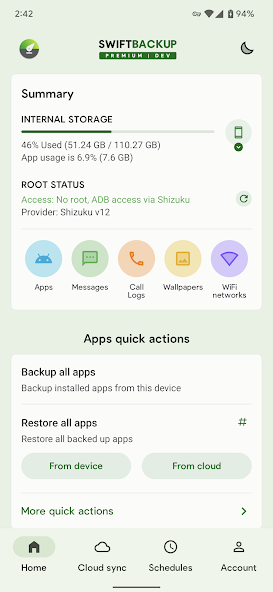
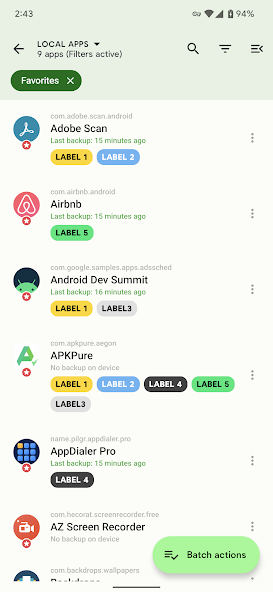
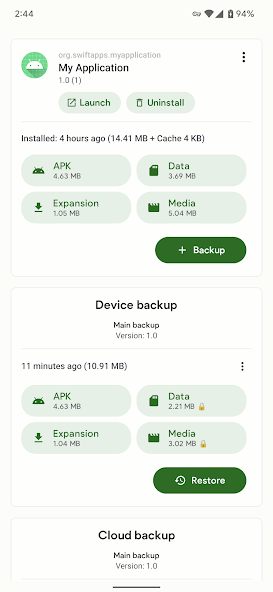
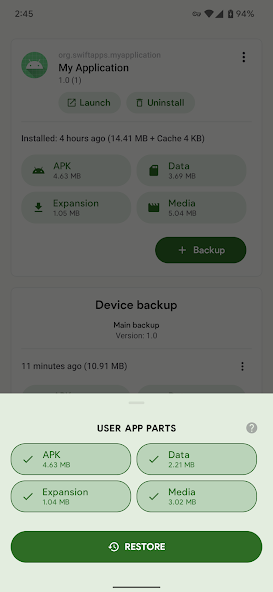
- App Data Management: Backs up and restores APKs, app data, and expansion files.
- Cloud Integration: Supports popular platforms like Google Drive, Dropbox, and OneDrive for remote storage.
- System Backups: Captures SMS, call logs, and applied wallpaper configurations.
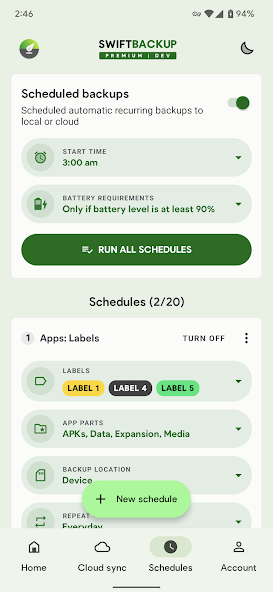
- Scheduled Tasks: Allows users to automate backup routines to ensure data is always current.
- Root Enhancements: Offers advanced batch operations and data restoration capabilities for rooted devices.
Use Cases
- Device Migration: Moving all applications and personal records to a new smartphone.
- ROM Customization: Safeguarding system states before flashing new firmware or updates.
- Storage Optimization: Archiving rarely used applications to the cloud to free up local space.
- Data Recovery: Restoring specific message threads or call histories after an accidental deletion.
Why Choose Swift Backup
This tool distinguishes itself through its clean, modern interface and high-speed execution. Unlike traditional backup solutions that can be cumbersome, Swift Backup prioritizes a user-centric design that simplifies complex file management tasks. It provides a stable bridge between local device storage and cloud ecosystems, ensuring that your digital life remains portable and secure.
Pros and Cons
Pros
- Fast batch processing for multiple applications.
- Clean, ad-free user interface.
- Granular control over what data is included in backups.
Cons
- Advanced features require root access.
- Cloud syncing requires a stable internet connection.
Final Verdict
Swift Backup is an efficient and modern solution for Android data management, offering a balance between ease of use and advanced functionality. It is a highly recommended tool for anyone looking to secure their mobile information against hardware failure or software changes.
Ratings & Reviews
Please log in to write a review.
No reviews yet. Be the first to rate!