'%3e%3cpath%20fill='%230CCF60'%20d='M158.25%20175.542c0-29.271%2023.729-53%2053-53h131.375c29.271%200%2053%2023.729%2053%2053v131.023c0%2029.271-23.729%2053-53%2053H211.25c-29.271%200-53-23.729-53-53V175.542Z'/%3e%3cpath%20fill='%23D2DE75'%20d='M158.25%20452.518c0-29.271%2023.729-53%2053-53h131.375c29.271%200%2053%2023.729%2053%2053v131.024c0%2029.271-23.729%2053-53%2053H211.25c-29.271%200-53-23.729-53-53V452.518Z'/%3e%3cpath%20fill='%2315B66A'%20d='M434.875%20175.542c0-29.271%2023.729-53%2053-53H619.25c29.271%200%2053%2023.729%2053%2053v131.023c0%2029.271-23.729%2053-53%2053H487.875c-29.271%200-53-23.729-53-53V175.542Z'/%3e%3cpath%20fill='%23E7A95D'%20d='M434.875%20452.518c0-29.271%2023.729-53%2053-53H619.25c29.271%200%2053%2023.729%2053%2053v131.024c0%2029.271-23.729%2053-53%2053H487.875c-29.271%200-53-23.729-53-53V452.518Z'/%3e%3cpath%20fill='url(%23b)'%20d='M728.088%20123.584C586.142%2039.806%209.186-194.997%204.001%20342.299c-.08%208.242%206.658%2015.349%2014.9%2015.322l81.72-.262c8.736-.028%2015.536-8.148%2015.058-16.87-31.398-572.572%20754.324-133.144%20612.409-216.905Z'/%3e%3c/g%3e%3cdefs%3e%3clinearGradient%20id='b'%20x1='34.575'%20x2='673.419'%20y1='229.473'%20y2='-93.138'%20gradientUnits='userSpaceOnUse'%3e%3cstop%20stop-color='%2328E77B'/%3e%3cstop%20offset='1'%20stop-color='%2315B66A'/%3e%3c/linearGradient%3e%3cfilter%20id='a'%20width='749.251'%20height='644.542'%20x='0'%20y='0'%20color-interpolation-filters='sRGB'%20filterUnits='userSpaceOnUse'%3e%3cfeFlood%20flood-opacity='0'%20result='BackgroundImageFix'/%3e%3cfeColorMatrix%20in='SourceAlpha'%20result='hardAlpha'%20values='0%200%200%200%200%200%200%200%200%200%200%200%200%200%200%200%200%200%20127%200'/%3e%3cfeOffset%20dy='4'/%3e%3cfeGaussianBlur%20stdDeviation='2'/%3e%3cfeComposite%20in2='hardAlpha'%20operator='out'/%3e%3cfeColorMatrix%20values='0%200%200%200%200%200%200%200%200%200%200%200%200%200%200%200%200%200%200.25%200'/%3e%3cfeBlend%20in2='BackgroundImageFix'%20result='effect1_dropShadow_23_251'/%3e%3cfeBlend%20in='SourceGraphic'%20in2='effect1_dropShadow_23_251'%20result='shape'/%3e%3c/filter%3e%3c/defs%3e%3c/svg%3e)




About ZArchiver
Learn more about this application's features and capabilities.
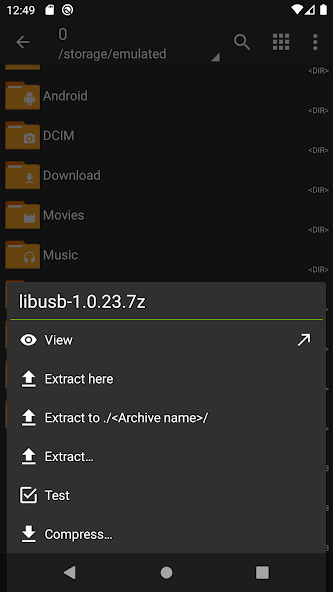
ZArchiver is a dedicated archive management tool designed for Android users who need precise control over compressed files. Whether you are managing large data sets or simple documents, this software provides a functional interface to create and extract various archive formats directly on your mobile device. It solves the common mobile limitation of handling complex file extensions like 7z, rar, and multi-part archives without requiring a desktop computer.
Key Features
- Extensive Format Support: Create archives in 7z, ZIP, BZIP2, and GZIP, while extracting nearly any format including RAR, ISO, and ARJ.
- Multithreading Support: Utilizes multi-core processors to speed up the compression and decompression processes significantly.
- Encrypted File Management: Supports creating and opening password-protected archives to ensure data security.
- Partial Extraction: Allows users to view and extract specific files from within an archive without decompressing the entire folder.
- Multi-Part Archive Handling: Seamlessly manages the extraction of split volumes (e.g., .001, .002) common in large software distributions.
Use Cases
- File Compression: Reducing the size of high-resolution photos or documents before sending them via email or messaging platforms.
- Storage Optimization: Bundling old projects into compressed formats to free up internal storage space on your device.
- Accessing Downloads: Opening compressed software patches or game assets downloaded from the web.
- Data Security: Protecting sensitive information by adding password encryption to local file backups.
Why Choose ZArchiver
ZArchiver stands out because it prioritizes utility over aesthetics. Unlike many mobile file managers, it offers a clean, ad-free environment that focuses on technical performance and wide-ranging compatibility. It is the go-to platform for power users who require stable performance when handling nested folders or specialized archive types.
Pros and Cons
Pros
- Completely free of intrusive advertisements.
- Small app footprint with minimal resource consumption.
- Native support for UTF-8/UTF-16, ensuring correct filename display.
Cons
- The interface may feel outdated to users accustomed to modern design trends.
- Lacks cloud storage integration for direct remote extraction.
Final Verdict
ZArchiver is a reliable and highly efficient utility for anyone needing deep archive management on Android. It balances technical depth with a straightforward workflow, making it an essential tool for mobile file organization.
Ratings & Reviews
Please log in to write a review.
No reviews yet. Be the first to rate!