'%3e%3cpath%20fill='%230CCF60'%20d='M158.25%20175.542c0-29.271%2023.729-53%2053-53h131.375c29.271%200%2053%2023.729%2053%2053v131.023c0%2029.271-23.729%2053-53%2053H211.25c-29.271%200-53-23.729-53-53V175.542Z'/%3e%3cpath%20fill='%23D2DE75'%20d='M158.25%20452.518c0-29.271%2023.729-53%2053-53h131.375c29.271%200%2053%2023.729%2053%2053v131.024c0%2029.271-23.729%2053-53%2053H211.25c-29.271%200-53-23.729-53-53V452.518Z'/%3e%3cpath%20fill='%2315B66A'%20d='M434.875%20175.542c0-29.271%2023.729-53%2053-53H619.25c29.271%200%2053%2023.729%2053%2053v131.023c0%2029.271-23.729%2053-53%2053H487.875c-29.271%200-53-23.729-53-53V175.542Z'/%3e%3cpath%20fill='%23E7A95D'%20d='M434.875%20452.518c0-29.271%2023.729-53%2053-53H619.25c29.271%200%2053%2023.729%2053%2053v131.024c0%2029.271-23.729%2053-53%2053H487.875c-29.271%200-53-23.729-53-53V452.518Z'/%3e%3cpath%20fill='url(%23b)'%20d='M728.088%20123.584C586.142%2039.806%209.186-194.997%204.001%20342.299c-.08%208.242%206.658%2015.349%2014.9%2015.322l81.72-.262c8.736-.028%2015.536-8.148%2015.058-16.87-31.398-572.572%20754.324-133.144%20612.409-216.905Z'/%3e%3c/g%3e%3cdefs%3e%3clinearGradient%20id='b'%20x1='34.575'%20x2='673.419'%20y1='229.473'%20y2='-93.138'%20gradientUnits='userSpaceOnUse'%3e%3cstop%20stop-color='%2328E77B'/%3e%3cstop%20offset='1'%20stop-color='%2315B66A'/%3e%3c/linearGradient%3e%3cfilter%20id='a'%20width='749.251'%20height='644.542'%20x='0'%20y='0'%20color-interpolation-filters='sRGB'%20filterUnits='userSpaceOnUse'%3e%3cfeFlood%20flood-opacity='0'%20result='BackgroundImageFix'/%3e%3cfeColorMatrix%20in='SourceAlpha'%20result='hardAlpha'%20values='0%200%200%200%200%200%200%200%200%200%200%200%200%200%200%200%200%200%20127%200'/%3e%3cfeOffset%20dy='4'/%3e%3cfeGaussianBlur%20stdDeviation='2'/%3e%3cfeComposite%20in2='hardAlpha'%20operator='out'/%3e%3cfeColorMatrix%20values='0%200%200%200%200%200%200%200%200%200%200%200%200%200%200%200%200%200%200.25%200'/%3e%3cfeBlend%20in2='BackgroundImageFix'%20result='effect1_dropShadow_23_251'/%3e%3cfeBlend%20in='SourceGraphic'%20in2='effect1_dropShadow_23_251'%20result='shape'/%3e%3c/filter%3e%3c/defs%3e%3c/svg%3e)




About Cam Scan for PDF & Doc Scanner
Learn more about this application's features and capabilities.
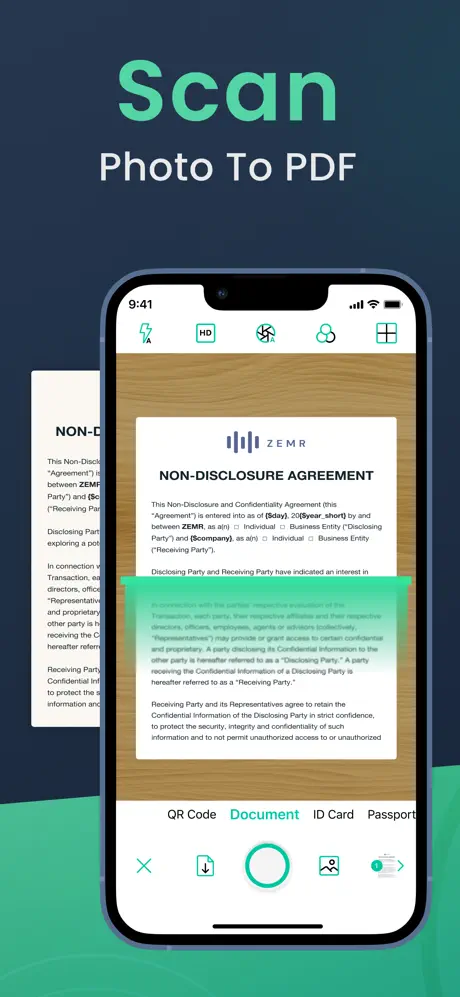
Cam Scan for PDF Doc Scanner is a mobile productivity tool designed to transform physical documents into high-quality digital files. This software is built for students, freelancers, and office professionals who need to digitize paperwork on the go without relying on bulky hardware. By using advanced image processing, it solves the problem of blurry or poorly lit document captures, ensuring that every scan is legible and professional for sharing or archiving.
Key Features
- Smart Edge Detection: Automatically identifies the borders of a document to provide a clean, cropped image.
- Enhanced Image Processing: Includes filters to improve brightness, contrast, and sharpness for better readability.
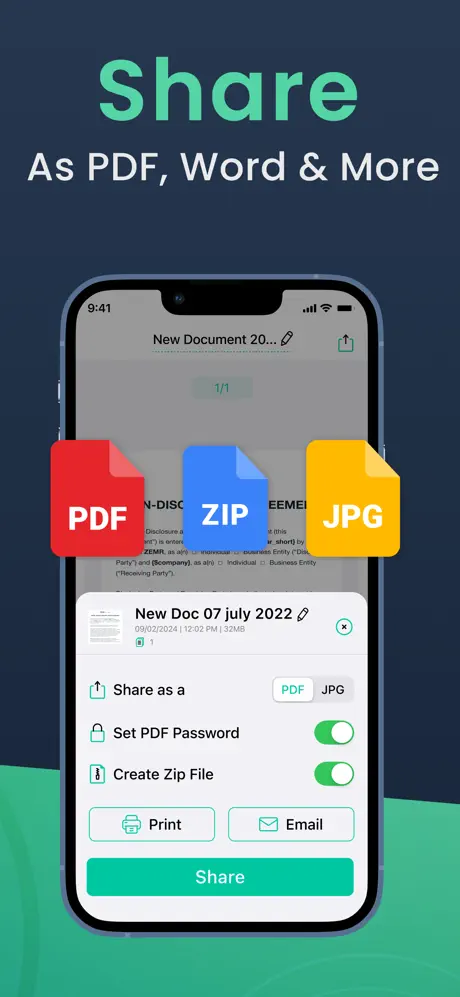
- PDF and JPEG Export: Allows users to save scanned files in multiple formats depending on their specific needs.
- Batch Scanning: Enables the capture of multi-page documents in a single session to create a unified PDF file.
- Optical Character Recognition (OCR): Extracts text from images to facilitate searching and editing within the document.
Use Cases
- Expense Management: Capture receipts and invoices immediately to simplify tax preparation and reimbursement.
- Academic Organization: Scan handwritten notes, whiteboards, and textbook pages to keep study materials in a digital format.
- Contract Signing: Digitally capture signed paper agreements and send them via email or cloud storage platforms.
- ID Archiving: Maintain secure digital copies of personal identification, such as passports or driver’s licenses.
Why Choose Cam Scan for PDF Doc Scanner
This platform stands out for its balance of simplicity and technical precision. As a versatile scanning tool, it eliminates the need for manual adjustments by automating the most difficult parts of the digitization process. It provides a reliable benefit for users who prioritize speed and document clarity in their daily workflow.
Pros and Cons
Pros
- High-speed processing for quick document turnaround.
- Intuitive interface that requires no technical expertise.
- Effective perspective correction for angled shots.
Cons
- OCR accuracy may vary depending on the quality of handwriting.
- Requires stable lighting conditions for optimal results.
Final Verdict
Cam Scan for PDF Doc Scanner is an efficient and practical solution for anyone needing a portable digitization tool. It successfully bridges the gap between physical paperwork and digital storage with a streamlined, user-friendly approach.
Ratings & Reviews
Please log in to write a review.
No reviews yet. Be the first to rate!