'%3e%3cpath%20fill='%230CCF60'%20d='M158.25%20175.542c0-29.271%2023.729-53%2053-53h131.375c29.271%200%2053%2023.729%2053%2053v131.023c0%2029.271-23.729%2053-53%2053H211.25c-29.271%200-53-23.729-53-53V175.542Z'/%3e%3cpath%20fill='%23D2DE75'%20d='M158.25%20452.518c0-29.271%2023.729-53%2053-53h131.375c29.271%200%2053%2023.729%2053%2053v131.024c0%2029.271-23.729%2053-53%2053H211.25c-29.271%200-53-23.729-53-53V452.518Z'/%3e%3cpath%20fill='%2315B66A'%20d='M434.875%20175.542c0-29.271%2023.729-53%2053-53H619.25c29.271%200%2053%2023.729%2053%2053v131.023c0%2029.271-23.729%2053-53%2053H487.875c-29.271%200-53-23.729-53-53V175.542Z'/%3e%3cpath%20fill='%23E7A95D'%20d='M434.875%20452.518c0-29.271%2023.729-53%2053-53H619.25c29.271%200%2053%2023.729%2053%2053v131.024c0%2029.271-23.729%2053-53%2053H487.875c-29.271%200-53-23.729-53-53V452.518Z'/%3e%3cpath%20fill='url(%23b)'%20d='M728.088%20123.584C586.142%2039.806%209.186-194.997%204.001%20342.299c-.08%208.242%206.658%2015.349%2014.9%2015.322l81.72-.262c8.736-.028%2015.536-8.148%2015.058-16.87-31.398-572.572%20754.324-133.144%20612.409-216.905Z'/%3e%3c/g%3e%3cdefs%3e%3clinearGradient%20id='b'%20x1='34.575'%20x2='673.419'%20y1='229.473'%20y2='-93.138'%20gradientUnits='userSpaceOnUse'%3e%3cstop%20stop-color='%2328E77B'/%3e%3cstop%20offset='1'%20stop-color='%2315B66A'/%3e%3c/linearGradient%3e%3cfilter%20id='a'%20width='749.251'%20height='644.542'%20x='0'%20y='0'%20color-interpolation-filters='sRGB'%20filterUnits='userSpaceOnUse'%3e%3cfeFlood%20flood-opacity='0'%20result='BackgroundImageFix'/%3e%3cfeColorMatrix%20in='SourceAlpha'%20result='hardAlpha'%20values='0%200%200%200%200%200%200%200%200%200%200%200%200%200%200%200%200%200%20127%200'/%3e%3cfeOffset%20dy='4'/%3e%3cfeGaussianBlur%20stdDeviation='2'/%3e%3cfeComposite%20in2='hardAlpha'%20operator='out'/%3e%3cfeColorMatrix%20values='0%200%200%200%200%200%200%200%200%200%200%200%200%200%200%200%200%200%200.25%200'/%3e%3cfeBlend%20in2='BackgroundImageFix'%20result='effect1_dropShadow_23_251'/%3e%3cfeBlend%20in='SourceGraphic'%20in2='effect1_dropShadow_23_251'%20result='shape'/%3e%3c/filter%3e%3c/defs%3e%3c/svg%3e)

About Final Cut Camera
Learn more about this application's features and capabilities.
Final Cut Camera is a professional-grade video capture tool designed for filmmakers, content creators, and social media professionals who require granular control over their mobile cinematography. This software bridge the gap between standard smartphone recording and professional production workflows, solving the problem of automated settings that often ruin high-stakes footage. It serves as a standalone recording utility or a seamless companion for multi-camera live switching.
Key Features
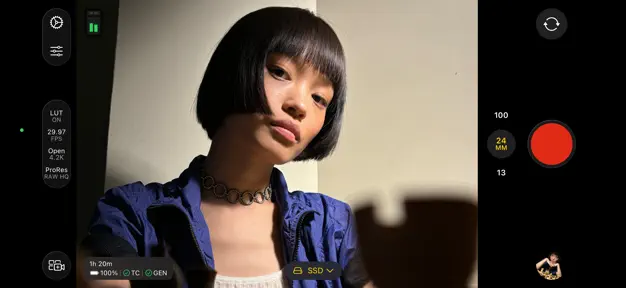
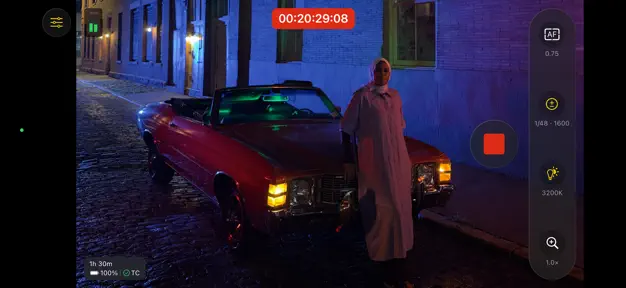
- Manual Control Suite: Adjust shutter speed, ISO, white balance, and focus with professional precision.
- Resolution and Frame Rates: Record in various formats including 4K, 1080p, and ProRes for maximum post-production flexibility.
- Live Multicam Integration: Wirelessly connect multiple devices to Final Cut Pro on iPad for real-time directorial monitoring.
- Focus Peaking and Overexposure Indicators: Utilize visual aids to ensure every shot is sharp and properly exposed.
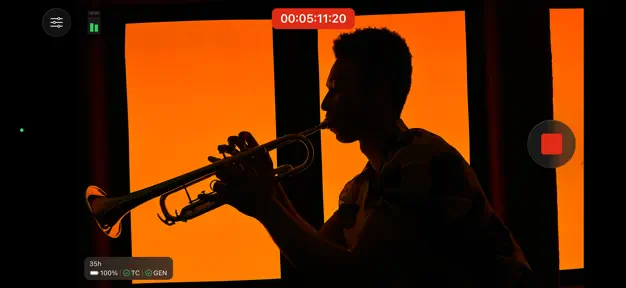
- Audio Monitoring: Track input levels through on-screen meters to maintain high-fidelity sound recording.
Use Cases
- Independent Filmmaking: Capture high-quality cinematic sequences with locked exposure and focus to maintain visual consistency.
- Live Event Production: Connect several iPhones to a central iPad to switch angles live during interviews or performances.
- Social Media Content: Record vertical or horizontal video with professional bitrates for better color grading results.
- Vlogging: Monitor audio levels and frame rates while recording yourself to ensure technical quality before editing.
Why Choose Final Cut Camera
This platform provides the technical benefits of a dedicated cinema camera within a mobile interface. By offering direct integration with the Apple ecosystem, the software simplifies the file transfer process and enhances the creative capabilities of mobile hardware without the need for expensive external equipment.
Pros and Cons
Pros
- Professional-level manual overrides for video settings.
- Low-latency wireless connection for multi-camera setups.
- Clean, intuitive interface optimized for quick adjustments.
Cons
- Advanced codecs like ProRes require significant storage space.
- Extensive use of manual features may drain battery faster than standard apps.
Final Verdict
Final Cut Camera is a powerful tool that transforms a mobile device into a professional video production unit. It offers a balanced mix of manual control and ecosystem integration, making it an essential download for serious videographers.
Ratings & Reviews
Please log in to write a review.
No reviews yet. Be the first to rate!