'%3e%3cpath%20fill='%230CCF60'%20d='M158.25%20175.542c0-29.271%2023.729-53%2053-53h131.375c29.271%200%2053%2023.729%2053%2053v131.023c0%2029.271-23.729%2053-53%2053H211.25c-29.271%200-53-23.729-53-53V175.542Z'/%3e%3cpath%20fill='%23D2DE75'%20d='M158.25%20452.518c0-29.271%2023.729-53%2053-53h131.375c29.271%200%2053%2023.729%2053%2053v131.024c0%2029.271-23.729%2053-53%2053H211.25c-29.271%200-53-23.729-53-53V452.518Z'/%3e%3cpath%20fill='%2315B66A'%20d='M434.875%20175.542c0-29.271%2023.729-53%2053-53H619.25c29.271%200%2053%2023.729%2053%2053v131.023c0%2029.271-23.729%2053-53%2053H487.875c-29.271%200-53-23.729-53-53V175.542Z'/%3e%3cpath%20fill='%23E7A95D'%20d='M434.875%20452.518c0-29.271%2023.729-53%2053-53H619.25c29.271%200%2053%2023.729%2053%2053v131.024c0%2029.271-23.729%2053-53%2053H487.875c-29.271%200-53-23.729-53-53V452.518Z'/%3e%3cpath%20fill='url(%23b)'%20d='M728.088%20123.584C586.142%2039.806%209.186-194.997%204.001%20342.299c-.08%208.242%206.658%2015.349%2014.9%2015.322l81.72-.262c8.736-.028%2015.536-8.148%2015.058-16.87-31.398-572.572%20754.324-133.144%20612.409-216.905Z'/%3e%3c/g%3e%3cdefs%3e%3clinearGradient%20id='b'%20x1='34.575'%20x2='673.419'%20y1='229.473'%20y2='-93.138'%20gradientUnits='userSpaceOnUse'%3e%3cstop%20stop-color='%2328E77B'/%3e%3cstop%20offset='1'%20stop-color='%2315B66A'/%3e%3c/linearGradient%3e%3cfilter%20id='a'%20width='749.251'%20height='644.542'%20x='0'%20y='0'%20color-interpolation-filters='sRGB'%20filterUnits='userSpaceOnUse'%3e%3cfeFlood%20flood-opacity='0'%20result='BackgroundImageFix'/%3e%3cfeColorMatrix%20in='SourceAlpha'%20result='hardAlpha'%20values='0%200%200%200%200%200%200%200%200%200%200%200%200%200%200%200%200%200%20127%200'/%3e%3cfeOffset%20dy='4'/%3e%3cfeGaussianBlur%20stdDeviation='2'/%3e%3cfeComposite%20in2='hardAlpha'%20operator='out'/%3e%3cfeColorMatrix%20values='0%200%200%200%200%200%200%200%200%200%200%200%200%200%200%200%200%200%200.25%200'/%3e%3cfeBlend%20in2='BackgroundImageFix'%20result='effect1_dropShadow_23_251'/%3e%3cfeBlend%20in='SourceGraphic'%20in2='effect1_dropShadow_23_251'%20result='shape'/%3e%3c/filter%3e%3c/defs%3e%3c/svg%3e)



About Google Docs
Learn more about this application's features and capabilities.
Google Docs is a versatile cloud-based word processing software designed for individuals and teams who need to create, edit, and collaborate on documents in real-time. It solves the issue of version control and file compatibility by housing all data in a secure online environment accessible from any device. This tool is ideal for students, professionals, and remote teams who require a reliable platform for drafting everything from simple notes to complex business reports.
Key Features
- Real-Time Collaboration: Multiple users can edit the same document simultaneously with live cursor tracking.
- Offline Mode: Create and modify documents without an internet connection, with changes syncing automatically once back online.
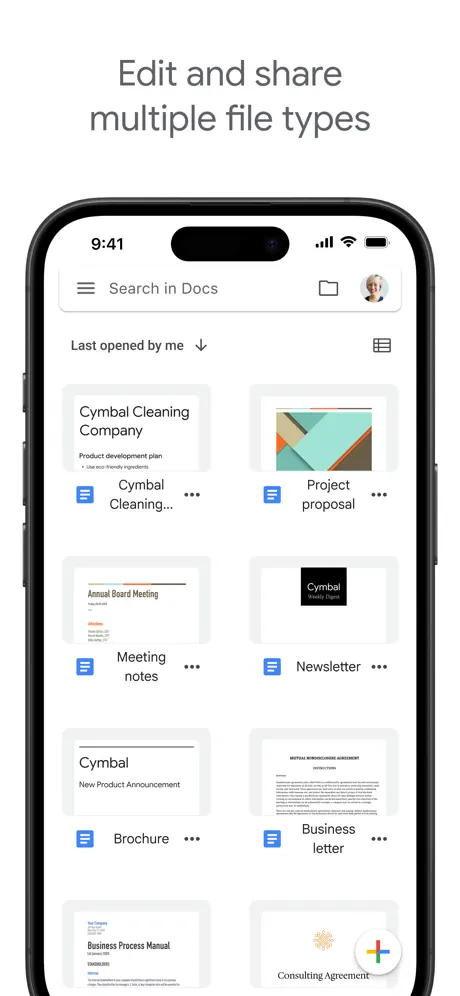
- Smart Formatting: Access a comprehensive suite of editing tools, fonts, and templates to professionalize any text.
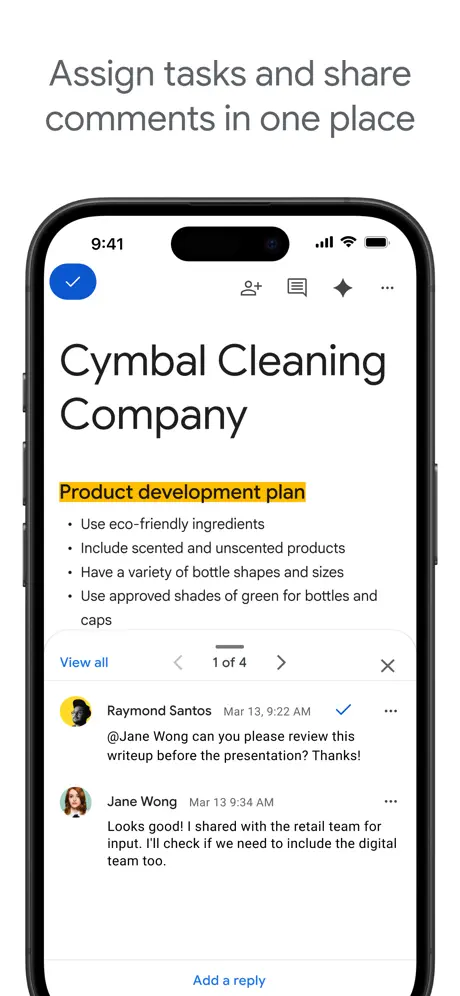
- Comment and Action Items: Assign tasks and leave feedback directly within the document to streamline workflows.
- Automatic Saving: Every change is saved instantly to the cloud, providing a robust version history to track or revert edits.
Use Cases
- Academic Projects: Groups of students can draft a shared research paper together while citing sources in a unified format.
- Remote Work: Managers can draft project proposals and receive instant feedback from stakeholders across different time zones.
- Content Creation: Writers can use the platform to outline articles and share them with editors for real-time proofreading.
- Meeting Minutes: Capture notes during live calls and immediately share the summary with all participants via a link.
Why Choose Google Docs
This platform stands out because it removes the barriers of traditional document management. As a web-based software, it eliminates the need for manual file transfers and ensures that everyone is always working on the most current version. The benefits include seamless integration with other productivity tools and a simplified user interface that requires no steep learning curve.
Pros and Cons
Pros
- Free to use for personal accounts with generous cloud storage.
- Excellent cross-platform compatibility between mobile and desktop.
- Intuitive interface that focuses on productivity and speed.
Cons
- Advanced desktop publishing features are limited compared to specialized local software.
- Performance may lag slightly when working on exceptionally large documents.
Final Verdict
Google Docs is an essential productivity tool that redefined how document collaboration works in the digital age. It provides a balanced mix of accessibility and powerful editing features, making it a top choice for anyone focused on efficiency and teamwork.
Ratings & Reviews
Please log in to write a review.
No reviews yet. Be the first to rate!