'%3e%3cpath%20fill='%230CCF60'%20d='M158.25%20175.542c0-29.271%2023.729-53%2053-53h131.375c29.271%200%2053%2023.729%2053%2053v131.023c0%2029.271-23.729%2053-53%2053H211.25c-29.271%200-53-23.729-53-53V175.542Z'/%3e%3cpath%20fill='%23D2DE75'%20d='M158.25%20452.518c0-29.271%2023.729-53%2053-53h131.375c29.271%200%2053%2023.729%2053%2053v131.024c0%2029.271-23.729%2053-53%2053H211.25c-29.271%200-53-23.729-53-53V452.518Z'/%3e%3cpath%20fill='%2315B66A'%20d='M434.875%20175.542c0-29.271%2023.729-53%2053-53H619.25c29.271%200%2053%2023.729%2053%2053v131.023c0%2029.271-23.729%2053-53%2053H487.875c-29.271%200-53-23.729-53-53V175.542Z'/%3e%3cpath%20fill='%23E7A95D'%20d='M434.875%20452.518c0-29.271%2023.729-53%2053-53H619.25c29.271%200%2053%2023.729%2053%2053v131.024c0%2029.271-23.729%2053-53%2053H487.875c-29.271%200-53-23.729-53-53V452.518Z'/%3e%3cpath%20fill='url(%23b)'%20d='M728.088%20123.584C586.142%2039.806%209.186-194.997%204.001%20342.299c-.08%208.242%206.658%2015.349%2014.9%2015.322l81.72-.262c8.736-.028%2015.536-8.148%2015.058-16.87-31.398-572.572%20754.324-133.144%20612.409-216.905Z'/%3e%3c/g%3e%3cdefs%3e%3clinearGradient%20id='b'%20x1='34.575'%20x2='673.419'%20y1='229.473'%20y2='-93.138'%20gradientUnits='userSpaceOnUse'%3e%3cstop%20stop-color='%2328E77B'/%3e%3cstop%20offset='1'%20stop-color='%2315B66A'/%3e%3c/linearGradient%3e%3cfilter%20id='a'%20width='749.251'%20height='644.542'%20x='0'%20y='0'%20color-interpolation-filters='sRGB'%20filterUnits='userSpaceOnUse'%3e%3cfeFlood%20flood-opacity='0'%20result='BackgroundImageFix'/%3e%3cfeColorMatrix%20in='SourceAlpha'%20result='hardAlpha'%20values='0%200%200%200%200%200%200%200%200%200%200%200%200%200%200%200%200%200%20127%200'/%3e%3cfeOffset%20dy='4'/%3e%3cfeGaussianBlur%20stdDeviation='2'/%3e%3cfeComposite%20in2='hardAlpha'%20operator='out'/%3e%3cfeColorMatrix%20values='0%200%200%200%200%200%200%200%200%200%200%200%200%200%200%200%200%200%200.25%200'/%3e%3cfeBlend%20in2='BackgroundImageFix'%20result='effect1_dropShadow_23_251'/%3e%3cfeBlend%20in='SourceGraphic'%20in2='effect1_dropShadow_23_251'%20result='shape'/%3e%3c/filter%3e%3c/defs%3e%3c/svg%3e)




About Google Drive – online backup
Learn more about this application's features and capabilities.
Google Drive is a comprehensive cloud storage solution designed for individuals and teams who need to secure, access, and share files from any location. This platform solves the challenge of local storage limitations and the risk of data loss by providing a centralized digital vault. Whether you are managing personal photos or professional documents, this tool ensures your data is synchronized across all devices, facilitating seamless transitions between mobile and desktop environments.
Key Features
- Cloud Storage and Backup: Securely store documents, images, and videos with automatic synchronization across devices.
- File Sharing and Permissions: Control access levels by granting view, comment, or edit rights to specific individuals or groups.
- Offline Access: Mark specific files for offline use, allowing you to view and edit content without an active internet connection.
- Advanced Search Technology: Utilize powerful search capabilities to find files by name, content type, or even objects within images.
- Built-in File Preview: View over 30 different file types directly within the app without needing to download or install additional software.
Use Cases
- Remote Collaboration: Share a project folder with team members to gather feedback and updates in real-time.
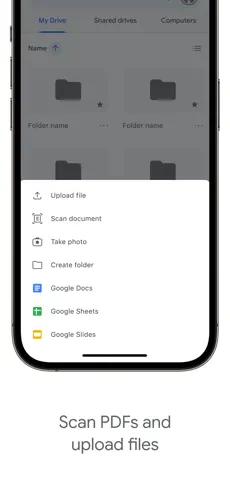
- Document Management: Scan physical documents using your mobile camera and save them as PDF files directly to the cloud.
- Media Archiving: Offload large video files and high-resolution photos from your device to free up local storage space.
- Secure File Distribution: Send large files via links instead of email attachments to bypass file size limitations.
Why Choose Google Drive
Choosing this software provides a reliable ecosystem for data management that integrates deeply with other productivity tools. The benefit of using Google Drive lies in its high availability and robust security protocols, making it a dependable choice for those who prioritize data integrity and instant accessibility.
Pros and Cons
Pros
- Deep integration with native productivity apps.
- Reliable cross-platform synchronization.
- Intuitive user interface for file organization.
Cons
- Requires a stable connection for initial large uploads.
- Organizational complexity can increase with shared drives.
Final Verdict
Google Drive is an essential utility for modern digital workflows, offering a stable and secure environment for file management.
Ratings & Reviews
Please log in to write a review.
No reviews yet. Be the first to rate!