'%3e%3cpath%20fill='%230CCF60'%20d='M158.25%20175.542c0-29.271%2023.729-53%2053-53h131.375c29.271%200%2053%2023.729%2053%2053v131.023c0%2029.271-23.729%2053-53%2053H211.25c-29.271%200-53-23.729-53-53V175.542Z'/%3e%3cpath%20fill='%23D2DE75'%20d='M158.25%20452.518c0-29.271%2023.729-53%2053-53h131.375c29.271%200%2053%2023.729%2053%2053v131.024c0%2029.271-23.729%2053-53%2053H211.25c-29.271%200-53-23.729-53-53V452.518Z'/%3e%3cpath%20fill='%2315B66A'%20d='M434.875%20175.542c0-29.271%2023.729-53%2053-53H619.25c29.271%200%2053%2023.729%2053%2053v131.023c0%2029.271-23.729%2053-53%2053H487.875c-29.271%200-53-23.729-53-53V175.542Z'/%3e%3cpath%20fill='%23E7A95D'%20d='M434.875%20452.518c0-29.271%2023.729-53%2053-53H619.25c29.271%200%2053%2023.729%2053%2053v131.024c0%2029.271-23.729%2053-53%2053H487.875c-29.271%200-53-23.729-53-53V452.518Z'/%3e%3cpath%20fill='url(%23b)'%20d='M728.088%20123.584C586.142%2039.806%209.186-194.997%204.001%20342.299c-.08%208.242%206.658%2015.349%2014.9%2015.322l81.72-.262c8.736-.028%2015.536-8.148%2015.058-16.87-31.398-572.572%20754.324-133.144%20612.409-216.905Z'/%3e%3c/g%3e%3cdefs%3e%3clinearGradient%20id='b'%20x1='34.575'%20x2='673.419'%20y1='229.473'%20y2='-93.138'%20gradientUnits='userSpaceOnUse'%3e%3cstop%20stop-color='%2328E77B'/%3e%3cstop%20offset='1'%20stop-color='%2315B66A'/%3e%3c/linearGradient%3e%3cfilter%20id='a'%20width='749.251'%20height='644.542'%20x='0'%20y='0'%20color-interpolation-filters='sRGB'%20filterUnits='userSpaceOnUse'%3e%3cfeFlood%20flood-opacity='0'%20result='BackgroundImageFix'/%3e%3cfeColorMatrix%20in='SourceAlpha'%20result='hardAlpha'%20values='0%200%200%200%200%200%200%200%200%200%200%200%200%200%200%200%200%200%20127%200'/%3e%3cfeOffset%20dy='4'/%3e%3cfeGaussianBlur%20stdDeviation='2'/%3e%3cfeComposite%20in2='hardAlpha'%20operator='out'/%3e%3cfeColorMatrix%20values='0%200%200%200%200%200%200%200%200%200%200%200%200%200%200%200%200%200%200.25%200'/%3e%3cfeBlend%20in2='BackgroundImageFix'%20result='effect1_dropShadow_23_251'/%3e%3cfeBlend%20in='SourceGraphic'%20in2='effect1_dropShadow_23_251'%20result='shape'/%3e%3c/filter%3e%3c/defs%3e%3c/svg%3e)

About Koder Code Editor
Learn more about this application's features and capabilities.
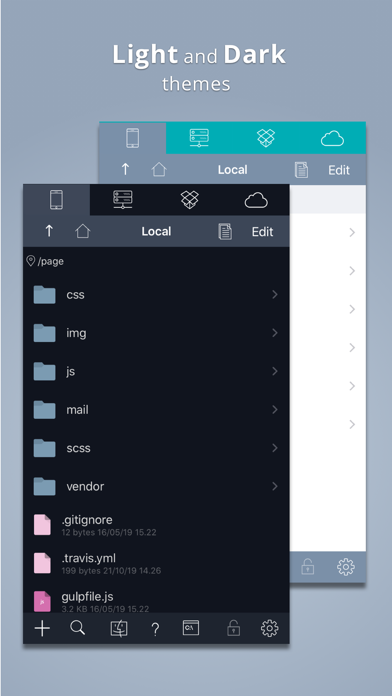
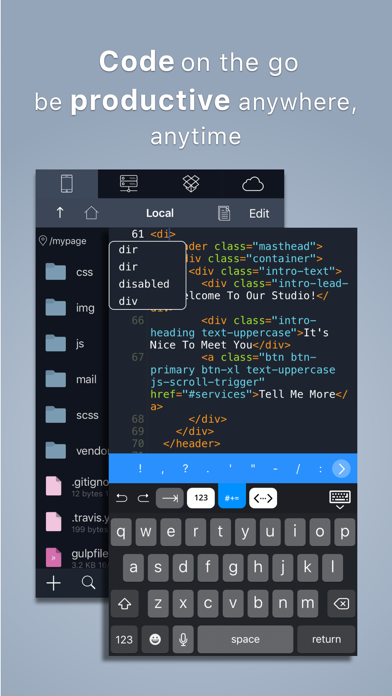
Koder is a specialized code editor designed for iPad and iPhone users who need a functional development environment on the move. This software serves developers, students, and programmers who require the ability to review, edit, and push code without a full desktop setup. By providing a clean interface and robust file management, it solves the problem of limited accessibility for developers working in remote or mobile environments.
Key Features
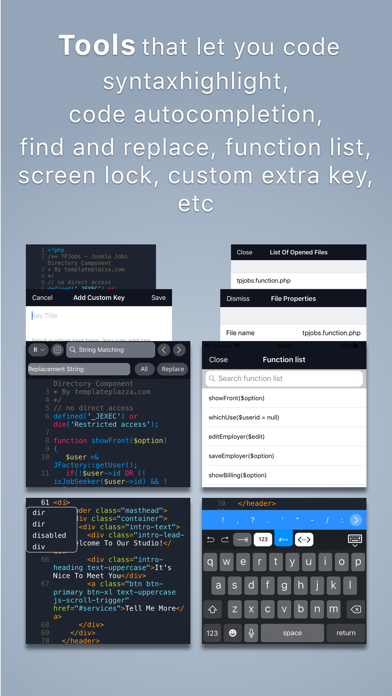
- Syntax Highlighting: Supports over 80 programming languages, ensuring code readability across various frameworks.
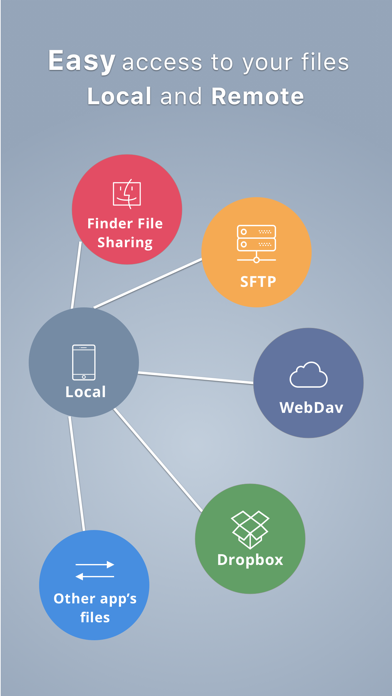
- File Management: Built-in support for local files and integration with remote servers via FTP, SFTP, and Dropbox.
- Code Completion: Integrated autocomplete functionality to speed up the writing process and reduce syntax errors.
- Built-in Terminal: Access a SSH terminal to manage servers and execute commands directly within the tool.
- External Keyboard Support: Fully optimized for hardware keyboards, including comprehensive shortcut support for faster navigation.
Use Cases
- Emergency Hotfixes: Quickly connect to a production server via SFTP to patch a critical bug while away from your desk.
- Learning and Practice: Students can use the platform to write and test snippets of Python or HTML/CSS during commutes.
- Code Review: Open repositories from cloud storage to perform detailed inspections of team contributions.
- Web Development: Utilize the built-in browser preview to see real-time changes made to web projects.
Why Choose Koder Code Editor
This platform bridges the gap between mobile convenience and professional utility. Unlike basic text editors, Koder Code Editor provides a sophisticated environment that mirrors desktop IDE capabilities, allowing for genuine productivity on a tablet or smartphone. It is an essential tool for maintaining workflow continuity regardless of location.
Pros and Cons
Pros
- Comprehensive protocol support including SFTP and FTPS.
- Clean, distraction-free interface optimized for iOS/iPadOS.
- Local and remote file synchronization.
Cons
- Lacks the full plugin ecosystem found in desktop editors.
- Screen real estate is limited when used on smaller iPhone models.
Final Verdict
Koder is a reliable and efficient mobile development tool that offers a professional feature set for coding on the go. It balances power and simplicity, making it a top choice for developers who need to maintain their projects away from their primary workstation.
Ratings & Reviews
Please log in to write a review.
No reviews yet. Be the first to rate!