'%3e%3cpath%20fill='%230CCF60'%20d='M158.25%20175.542c0-29.271%2023.729-53%2053-53h131.375c29.271%200%2053%2023.729%2053%2053v131.023c0%2029.271-23.729%2053-53%2053H211.25c-29.271%200-53-23.729-53-53V175.542Z'/%3e%3cpath%20fill='%23D2DE75'%20d='M158.25%20452.518c0-29.271%2023.729-53%2053-53h131.375c29.271%200%2053%2023.729%2053%2053v131.024c0%2029.271-23.729%2053-53%2053H211.25c-29.271%200-53-23.729-53-53V452.518Z'/%3e%3cpath%20fill='%2315B66A'%20d='M434.875%20175.542c0-29.271%2023.729-53%2053-53H619.25c29.271%200%2053%2023.729%2053%2053v131.023c0%2029.271-23.729%2053-53%2053H487.875c-29.271%200-53-23.729-53-53V175.542Z'/%3e%3cpath%20fill='%23E7A95D'%20d='M434.875%20452.518c0-29.271%2023.729-53%2053-53H619.25c29.271%200%2053%2023.729%2053%2053v131.024c0%2029.271-23.729%2053-53%2053H487.875c-29.271%200-53-23.729-53-53V452.518Z'/%3e%3cpath%20fill='url(%23b)'%20d='M728.088%20123.584C586.142%2039.806%209.186-194.997%204.001%20342.299c-.08%208.242%206.658%2015.349%2014.9%2015.322l81.72-.262c8.736-.028%2015.536-8.148%2015.058-16.87-31.398-572.572%20754.324-133.144%20612.409-216.905Z'/%3e%3c/g%3e%3cdefs%3e%3clinearGradient%20id='b'%20x1='34.575'%20x2='673.419'%20y1='229.473'%20y2='-93.138'%20gradientUnits='userSpaceOnUse'%3e%3cstop%20stop-color='%2328E77B'/%3e%3cstop%20offset='1'%20stop-color='%2315B66A'/%3e%3c/linearGradient%3e%3cfilter%20id='a'%20width='749.251'%20height='644.542'%20x='0'%20y='0'%20color-interpolation-filters='sRGB'%20filterUnits='userSpaceOnUse'%3e%3cfeFlood%20flood-opacity='0'%20result='BackgroundImageFix'/%3e%3cfeColorMatrix%20in='SourceAlpha'%20result='hardAlpha'%20values='0%200%200%200%200%200%200%200%200%200%200%200%200%200%200%200%200%200%20127%200'/%3e%3cfeOffset%20dy='4'/%3e%3cfeGaussianBlur%20stdDeviation='2'/%3e%3cfeComposite%20in2='hardAlpha'%20operator='out'/%3e%3cfeColorMatrix%20values='0%200%200%200%200%200%200%200%200%200%200%200%200%200%200%200%200%200%200.25%200'/%3e%3cfeBlend%20in2='BackgroundImageFix'%20result='effect1_dropShadow_23_251'/%3e%3cfeBlend%20in='SourceGraphic'%20in2='effect1_dropShadow_23_251'%20result='shape'/%3e%3c/filter%3e%3c/defs%3e%3c/svg%3e)

About Link to Windows
Learn more about this application's features and capabilities.
Link to Windows is a productivity software solution designed to bridge the gap between your iPhone and your Windows PC. It is built for professionals and multi-taskers who need to stay connected to their mobile communications without constantly switching devices. By integrating your smartphone directly into your desktop environment, this tool solves the problem of workflow interruption, allowing you to manage notifications, calls, and messages while remaining focused on your computer screen.
Key Features
- Instant Notification Sync: View and manage iOS notifications directly within the Windows Action Center.
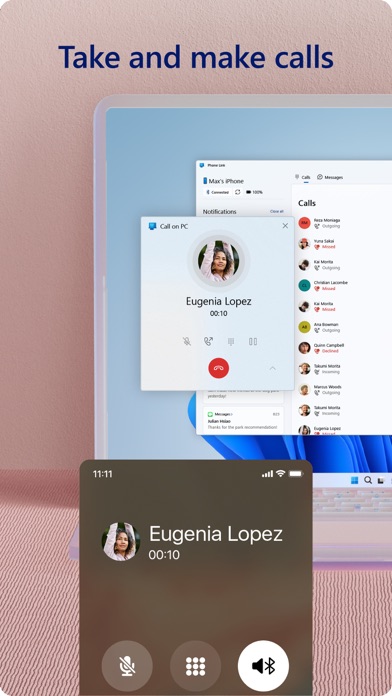
- Hands-Free Calling: Make and receive phone calls from your PC using your computer’s speakers and microphone.
- Message Integration: Read and reply to text messages from your desktop to maintain consistent communication.
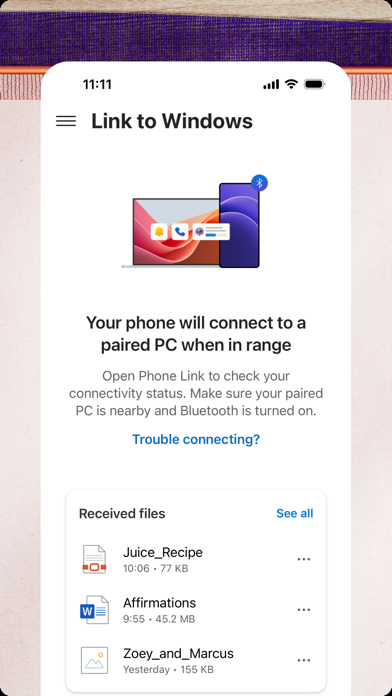
- Bluetooth Connectivity: Utilizes low-energy Bluetooth to pair devices securely and maintain a stable link.
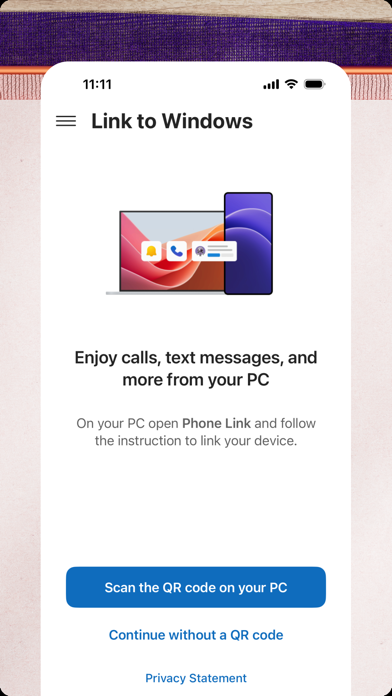
- Simplified Setup: Employs a straightforward QR code pairing process to sync the platform with your computer.
Use Cases
- Professional Focus: Keep your phone in your pocket or bag during work hours while still monitoring urgent alerts on your monitor.
- Efficient Communication: Type long replies to text messages using a full-sized physical keyboard instead of a mobile screen.
- Device Management: Monitor your phone’s battery life and signal strength directly from your Windows taskbar.
- Streamlined Workflow: Reduce the physical clutter of managing two separate devices on a single desk space.
Why Choose Link to Windows
This platform offers a seamless ecosystem for users who rely on both iOS and Windows. Unlike third-party alternatives, this official software provides a stable and secure connection that prioritizes privacy while significantly enhancing daily efficiency. It is a vital tool for anyone seeking a unified digital workspace.
Pros and Cons
Pros
- Minimal latency for message and notification delivery.
- Clean, native interface that blends with the Windows UI.
- Reduces the need to check your physical phone frequently.
Cons
- Requires a constant Bluetooth connection between devices.
- Some advanced features may vary based on Windows version.
Final Verdict
Link to Windows is a highly effective utility for synchronizing your iPhone with your PC to maximize productivity. While it focuses on core communication features, its stability and ease of use make it an essential download for Windows power users.
Ratings & Reviews
Please log in to write a review.
No reviews yet. Be the first to rate!