'%3e%3cpath%20fill='%230CCF60'%20d='M158.25%20175.542c0-29.271%2023.729-53%2053-53h131.375c29.271%200%2053%2023.729%2053%2053v131.023c0%2029.271-23.729%2053-53%2053H211.25c-29.271%200-53-23.729-53-53V175.542Z'/%3e%3cpath%20fill='%23D2DE75'%20d='M158.25%20452.518c0-29.271%2023.729-53%2053-53h131.375c29.271%200%2053%2023.729%2053%2053v131.024c0%2029.271-23.729%2053-53%2053H211.25c-29.271%200-53-23.729-53-53V452.518Z'/%3e%3cpath%20fill='%2315B66A'%20d='M434.875%20175.542c0-29.271%2023.729-53%2053-53H619.25c29.271%200%2053%2023.729%2053%2053v131.023c0%2029.271-23.729%2053-53%2053H487.875c-29.271%200-53-23.729-53-53V175.542Z'/%3e%3cpath%20fill='%23E7A95D'%20d='M434.875%20452.518c0-29.271%2023.729-53%2053-53H619.25c29.271%200%2053%2023.729%2053%2053v131.024c0%2029.271-23.729%2053-53%2053H487.875c-29.271%200-53-23.729-53-53V452.518Z'/%3e%3cpath%20fill='url(%23b)'%20d='M728.088%20123.584C586.142%2039.806%209.186-194.997%204.001%20342.299c-.08%208.242%206.658%2015.349%2014.9%2015.322l81.72-.262c8.736-.028%2015.536-8.148%2015.058-16.87-31.398-572.572%20754.324-133.144%20612.409-216.905Z'/%3e%3c/g%3e%3cdefs%3e%3clinearGradient%20id='b'%20x1='34.575'%20x2='673.419'%20y1='229.473'%20y2='-93.138'%20gradientUnits='userSpaceOnUse'%3e%3cstop%20stop-color='%2328E77B'/%3e%3cstop%20offset='1'%20stop-color='%2315B66A'/%3e%3c/linearGradient%3e%3cfilter%20id='a'%20width='749.251'%20height='644.542'%20x='0'%20y='0'%20color-interpolation-filters='sRGB'%20filterUnits='userSpaceOnUse'%3e%3cfeFlood%20flood-opacity='0'%20result='BackgroundImageFix'/%3e%3cfeColorMatrix%20in='SourceAlpha'%20result='hardAlpha'%20values='0%200%200%200%200%200%200%200%200%200%200%200%200%200%200%200%200%200%20127%200'/%3e%3cfeOffset%20dy='4'/%3e%3cfeGaussianBlur%20stdDeviation='2'/%3e%3cfeComposite%20in2='hardAlpha'%20operator='out'/%3e%3cfeColorMatrix%20values='0%200%200%200%200%200%200%200%200%200%200%200%200%200%200%200%200%200%200.25%200'/%3e%3cfeBlend%20in2='BackgroundImageFix'%20result='effect1_dropShadow_23_251'/%3e%3cfeBlend%20in='SourceGraphic'%20in2='effect1_dropShadow_23_251'%20result='shape'/%3e%3c/filter%3e%3c/defs%3e%3c/svg%3e)




About Notability: AI Notes & PDF app
Learn more about this application's features and capabilities.
Notability is a versatile note-taking software designed for students, educators, and professionals who need a central hub for their ideas and documents. By combining handwriting, sketching, and audio recording, this platform solves the problem of fragmented information during lectures or meetings. Users can annotate PDFs, create digital journals, and utilize AI-driven features to streamline their workflows on iPad, iPhone, and Mac.
Key Features of Notability Multimedia Integration: Seamlessly combine ink, text, and photos in a single document.
Audio Note Sync: Record audio that automatically syncs with your handwritten notes for precise playback.
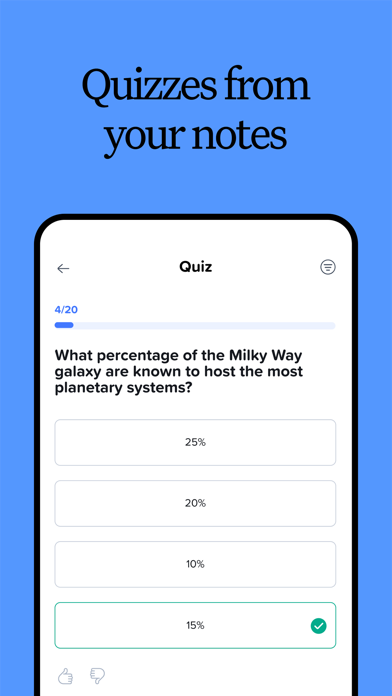
AI-Powered Tools: Convert handwriting to text and utilize AI assistance for summarizing or refining content.
Precision Inking: Smooth, pressure-sensitive digital ink with various pen and highlighter styles.
PDF Annotation: Import and mark up documents, textbooks, and presentation slides directly.
Cloud Synchronization: Keep all notebooks updated across multiple Apple devices via iCloud.
Notability Use Cases Academic Learning: Students can record classroom lectures while sketching diagrams that link directly to the audio timestamp.
Professional Meetings: Project managers can annotate project briefs and share meeting minutes in PDF or image formats.
Creative Journaling: Individuals use the infinite scroll and customizable templates for digital scrapbooking and habit tracking.
Paperless Office: Businesses can digitize physical forms by scanning documents and signing them electronically within the app.
Why Choose Notability Notability offers a unique balance of simplicity and powerful functionality. Unlike standard text editors, it prioritizes the natural feel of handwriting while providing the organizational benefits of digital storage. Its ability to marry audio recordings with visual notes makes it an essential tool for anyone who needs to capture complex information quickly and review it with high context later.
Pros and Cons Pros
Exceptional audio-to-note synchronization.
Minimalist interface that focuses on the writing experience.
Reliable cross-device syncing within the Apple ecosystem.
Extensive template library and community-shared notes.
Cons
Advanced features require a recurring subscription.
Limited functionality on non-Apple platforms.
Final Verdict Notability remains a top-tier choice for users seeking a tactile yet high-tech approach to digital organization. Its robust feature set and intuitive design make it a reliable companion for both intensive academic study and everyday professional documentation.
Ratings & Reviews
Please log in to write a review.
No reviews yet. Be the first to rate!