'%3e%3cpath%20fill='%230CCF60'%20d='M158.25%20175.542c0-29.271%2023.729-53%2053-53h131.375c29.271%200%2053%2023.729%2053%2053v131.023c0%2029.271-23.729%2053-53%2053H211.25c-29.271%200-53-23.729-53-53V175.542Z'/%3e%3cpath%20fill='%23D2DE75'%20d='M158.25%20452.518c0-29.271%2023.729-53%2053-53h131.375c29.271%200%2053%2023.729%2053%2053v131.024c0%2029.271-23.729%2053-53%2053H211.25c-29.271%200-53-23.729-53-53V452.518Z'/%3e%3cpath%20fill='%2315B66A'%20d='M434.875%20175.542c0-29.271%2023.729-53%2053-53H619.25c29.271%200%2053%2023.729%2053%2053v131.023c0%2029.271-23.729%2053-53%2053H487.875c-29.271%200-53-23.729-53-53V175.542Z'/%3e%3cpath%20fill='%23E7A95D'%20d='M434.875%20452.518c0-29.271%2023.729-53%2053-53H619.25c29.271%200%2053%2023.729%2053%2053v131.024c0%2029.271-23.729%2053-53%2053H487.875c-29.271%200-53-23.729-53-53V452.518Z'/%3e%3cpath%20fill='url(%23b)'%20d='M728.088%20123.584C586.142%2039.806%209.186-194.997%204.001%20342.299c-.08%208.242%206.658%2015.349%2014.9%2015.322l81.72-.262c8.736-.028%2015.536-8.148%2015.058-16.87-31.398-572.572%20754.324-133.144%20612.409-216.905Z'/%3e%3c/g%3e%3cdefs%3e%3clinearGradient%20id='b'%20x1='34.575'%20x2='673.419'%20y1='229.473'%20y2='-93.138'%20gradientUnits='userSpaceOnUse'%3e%3cstop%20stop-color='%2328E77B'/%3e%3cstop%20offset='1'%20stop-color='%2315B66A'/%3e%3c/linearGradient%3e%3cfilter%20id='a'%20width='749.251'%20height='644.542'%20x='0'%20y='0'%20color-interpolation-filters='sRGB'%20filterUnits='userSpaceOnUse'%3e%3cfeFlood%20flood-opacity='0'%20result='BackgroundImageFix'/%3e%3cfeColorMatrix%20in='SourceAlpha'%20result='hardAlpha'%20values='0%200%200%200%200%200%200%200%200%200%200%200%200%200%200%200%200%200%20127%200'/%3e%3cfeOffset%20dy='4'/%3e%3cfeGaussianBlur%20stdDeviation='2'/%3e%3cfeComposite%20in2='hardAlpha'%20operator='out'/%3e%3cfeColorMatrix%20values='0%200%200%200%200%200%200%200%200%200%200%200%200%200%200%200%200%200%200.25%200'/%3e%3cfeBlend%20in2='BackgroundImageFix'%20result='effect1_dropShadow_23_251'/%3e%3cfeBlend%20in='SourceGraphic'%20in2='effect1_dropShadow_23_251'%20result='shape'/%3e%3c/filter%3e%3c/defs%3e%3c/svg%3e)




About Noted: Record & AI Transcribe
Learn more about this application's features and capabilities.
Noted is a versatile audio recording and note-taking platform designed for students, professionals, and journalists who need to capture information accurately. This software solves the problem of disconnected notes and audio by timestamping every word you type directly to the recording. By integrating AI-driven features, the tool helps users convert speech to text, making it easier to review lectures, meetings, and interviews without scrubbing through hours of audio manually.
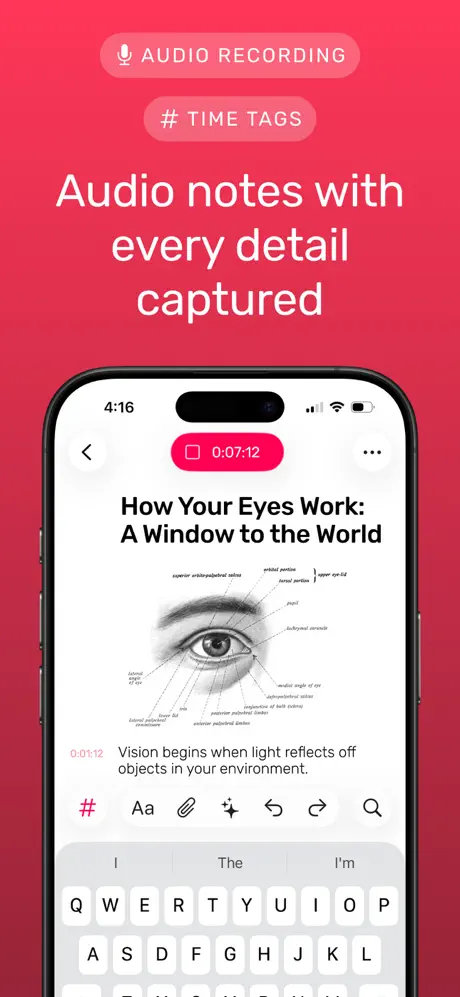
Key Features of Noted Intelligent Playback: Use the #TimeTag feature to mark important moments while recording for instant retrieval later.
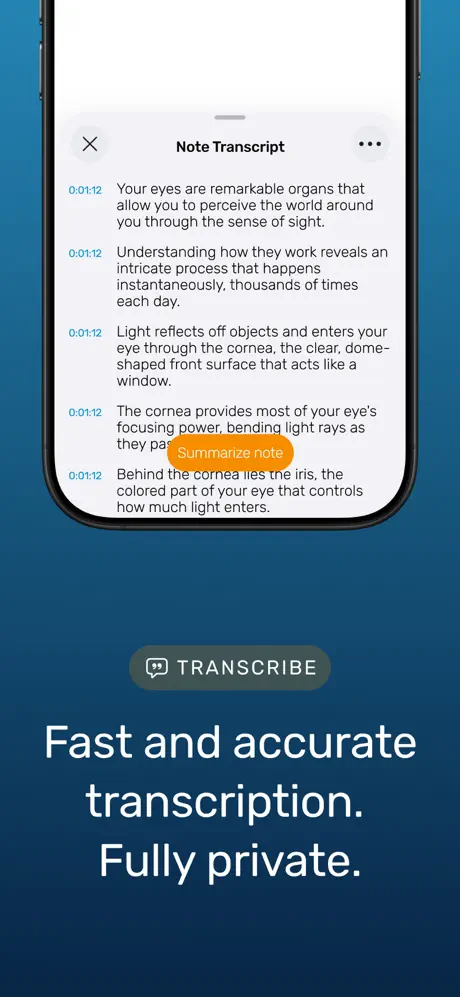
AI Transcription: Converts voice recordings into written text to streamline the documentation process and improve accessibility.
Noise Reduction: Advanced audio filtering tools that minimize background noise to ensure clear playback of voices.
Cross-Device Sync: Keep your recordings and text notes synchronized across iPhone, iPad, Mac, and Apple Watch.
Dictation Support: Allows users to speak their notes directly into the app, which then converts the input into formatted text.
Use Cases Academic Lectures: Students can record complex lessons while typing key concepts, ensuring they can revisit specific explanations with one tap.
Business Meetings: Professionals use the platform to document action items and decisions, providing a searchable audio trail of the discussion.
Journalism and Interviews: Reporters can focus on the conversation while the tool handles the recording and provides a baseline transcript for drafting stories.
Dictation and Brainstorming: Individuals can capture fleeting ideas on the go using the Apple Watch integration for hands-free note-taking.
Why Choose Noted This platform bridges the gap between traditional note-taking and high-quality audio recording. Unlike standard voice memos, Noted provides a structured environment where data is organized and searchable. Its focus on time-syncing ensures that you never lose the context of your written notes, making it a highly efficient tool for anyone dealing with high volumes of verbal information.
Pros and Cons Pros
Seamless integration across the Apple ecosystem.
Clean, distraction-free interface that facilitates focus.
Reliable AI transcription that handles various accents well.
Cons
Advanced AI features require a stable internet connection.
Full functionality is restricted to Apple hardware users.
Final Verdict Noted is an excellent productivity tool for those who rely heavily on audio-visual learning and documentation. It balances powerful AI transcription with a simple user interface, providing a reliable solution for capturing and organizing spoken information.
Ratings & Reviews
Please log in to write a review.
No reviews yet. Be the first to rate!