'%3e%3cpath%20fill='%230CCF60'%20d='M158.25%20175.542c0-29.271%2023.729-53%2053-53h131.375c29.271%200%2053%2023.729%2053%2053v131.023c0%2029.271-23.729%2053-53%2053H211.25c-29.271%200-53-23.729-53-53V175.542Z'/%3e%3cpath%20fill='%23D2DE75'%20d='M158.25%20452.518c0-29.271%2023.729-53%2053-53h131.375c29.271%200%2053%2023.729%2053%2053v131.024c0%2029.271-23.729%2053-53%2053H211.25c-29.271%200-53-23.729-53-53V452.518Z'/%3e%3cpath%20fill='%2315B66A'%20d='M434.875%20175.542c0-29.271%2023.729-53%2053-53H619.25c29.271%200%2053%2023.729%2053%2053v131.023c0%2029.271-23.729%2053-53%2053H487.875c-29.271%200-53-23.729-53-53V175.542Z'/%3e%3cpath%20fill='%23E7A95D'%20d='M434.875%20452.518c0-29.271%2023.729-53%2053-53H619.25c29.271%200%2053%2023.729%2053%2053v131.024c0%2029.271-23.729%2053-53%2053H487.875c-29.271%200-53-23.729-53-53V452.518Z'/%3e%3cpath%20fill='url(%23b)'%20d='M728.088%20123.584C586.142%2039.806%209.186-194.997%204.001%20342.299c-.08%208.242%206.658%2015.349%2014.9%2015.322l81.72-.262c8.736-.028%2015.536-8.148%2015.058-16.87-31.398-572.572%20754.324-133.144%20612.409-216.905Z'/%3e%3c/g%3e%3cdefs%3e%3clinearGradient%20id='b'%20x1='34.575'%20x2='673.419'%20y1='229.473'%20y2='-93.138'%20gradientUnits='userSpaceOnUse'%3e%3cstop%20stop-color='%2328E77B'/%3e%3cstop%20offset='1'%20stop-color='%2315B66A'/%3e%3c/linearGradient%3e%3cfilter%20id='a'%20width='749.251'%20height='644.542'%20x='0'%20y='0'%20color-interpolation-filters='sRGB'%20filterUnits='userSpaceOnUse'%3e%3cfeFlood%20flood-opacity='0'%20result='BackgroundImageFix'/%3e%3cfeColorMatrix%20in='SourceAlpha'%20result='hardAlpha'%20values='0%200%200%200%200%200%200%200%200%200%200%200%200%200%200%200%200%200%20127%200'/%3e%3cfeOffset%20dy='4'/%3e%3cfeGaussianBlur%20stdDeviation='2'/%3e%3cfeComposite%20in2='hardAlpha'%20operator='out'/%3e%3cfeColorMatrix%20values='0%200%200%200%200%200%200%200%200%200%200%200%200%200%200%200%200%200%200.25%200'/%3e%3cfeBlend%20in2='BackgroundImageFix'%20result='effect1_dropShadow_23_251'/%3e%3cfeBlend%20in='SourceGraphic'%20in2='effect1_dropShadow_23_251'%20result='shape'/%3e%3c/filter%3e%3c/defs%3e%3c/svg%3e)




About Otter Transcribe Voice Notes
Learn more about this application's features and capabilities.
Otter Transcribe Voice Notes is an AI-powered productivity tool designed to capture and convert spoken language into accurate, searchable text. The software serves as a digital meeting assistant for professionals, students, and journalists who struggle with the cognitive load of manual note-taking during live discussions. By integrating with major video conferencing platforms and mobile recording hardware, the tool solves the problem of missed details and inefficient documentation in fast-paced environments.
Key Features
- Real-Time Transcription: Converts live speech into text instantly with high accuracy and synchronized word highlighting.
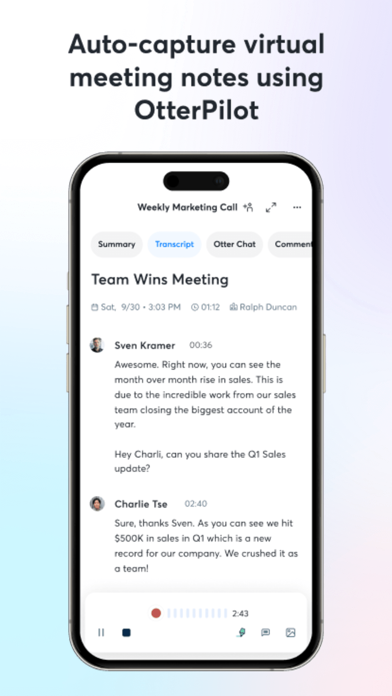
- OtterPilot Assistant: Automatically joins Zoom, Google Meet, and Microsoft Teams calls to record and summarize discussions.
- Automated Summaries: Generates concise meeting outlines and highlights key takeaways to save review time.
- Speaker Identification: Labels different participants automatically after initial training to provide context to the transcript.
- Media Import: Allows users to upload existing audio and video files for rapid text conversion and indexing.
- Custom Vocabulary: Supports the addition of specialized jargon, acronyms, and names to improve recognition precision.
Use Cases
- Corporate Meetings: Capture every decision and action item during board meetings or project syncs for easy distribution.
- Academic Lectures: Record university presentations to create a searchable study guide that includes photos of whiteboard slides.
- Journalistic Interviews: Transcribe long-form interviews rapidly, allowing for quick quote extraction and content drafting.
- Accessibility Support: Provide live captioning for individuals who are deaf or hard of hearing in both physical and virtual settings.
Why Choose Otter Transcribe Voice Notes
This platform offers a superior mobile experience by combining recording capabilities with advanced AI analysis. Unlike standard voice recorders, this tool transforms raw audio into a functional knowledge base that is fully searchable and collaborative. The primary benefit of the software is its ability to free the user from the distractions of writing, allowing for total engagement in the conversation while ensuring a perfect digital record remains.
Pros and Cons
Pros
- Seamless integration with major calendar and video conferencing tools.
- Fast processing speed for both live and imported media.
- Cross-platform synchronization across web and mobile devices.
Cons
- Primary language support is currently focused on English.
- Accuracy can decrease in environments with significant background noise.
Final Verdict
Otter Transcribe Voice Notes is a highly effective utility for anyone looking to automate their documentation process. It strikes a successful balance between transcription accuracy and actionable insights, making it a valuable asset for professional productivity.
Ratings & Reviews
Please log in to write a review.
No reviews yet. Be the first to rate!