'%3e%3cpath%20fill='%230CCF60'%20d='M158.25%20175.542c0-29.271%2023.729-53%2053-53h131.375c29.271%200%2053%2023.729%2053%2053v131.023c0%2029.271-23.729%2053-53%2053H211.25c-29.271%200-53-23.729-53-53V175.542Z'/%3e%3cpath%20fill='%23D2DE75'%20d='M158.25%20452.518c0-29.271%2023.729-53%2053-53h131.375c29.271%200%2053%2023.729%2053%2053v131.024c0%2029.271-23.729%2053-53%2053H211.25c-29.271%200-53-23.729-53-53V452.518Z'/%3e%3cpath%20fill='%2315B66A'%20d='M434.875%20175.542c0-29.271%2023.729-53%2053-53H619.25c29.271%200%2053%2023.729%2053%2053v131.023c0%2029.271-23.729%2053-53%2053H487.875c-29.271%200-53-23.729-53-53V175.542Z'/%3e%3cpath%20fill='%23E7A95D'%20d='M434.875%20452.518c0-29.271%2023.729-53%2053-53H619.25c29.271%200%2053%2023.729%2053%2053v131.024c0%2029.271-23.729%2053-53%2053H487.875c-29.271%200-53-23.729-53-53V452.518Z'/%3e%3cpath%20fill='url(%23b)'%20d='M728.088%20123.584C586.142%2039.806%209.186-194.997%204.001%20342.299c-.08%208.242%206.658%2015.349%2014.9%2015.322l81.72-.262c8.736-.028%2015.536-8.148%2015.058-16.87-31.398-572.572%20754.324-133.144%20612.409-216.905Z'/%3e%3c/g%3e%3cdefs%3e%3clinearGradient%20id='b'%20x1='34.575'%20x2='673.419'%20y1='229.473'%20y2='-93.138'%20gradientUnits='userSpaceOnUse'%3e%3cstop%20stop-color='%2328E77B'/%3e%3cstop%20offset='1'%20stop-color='%2315B66A'/%3e%3c/linearGradient%3e%3cfilter%20id='a'%20width='749.251'%20height='644.542'%20x='0'%20y='0'%20color-interpolation-filters='sRGB'%20filterUnits='userSpaceOnUse'%3e%3cfeFlood%20flood-opacity='0'%20result='BackgroundImageFix'/%3e%3cfeColorMatrix%20in='SourceAlpha'%20result='hardAlpha'%20values='0%200%200%200%200%200%200%200%200%200%200%200%200%200%200%200%200%200%20127%200'/%3e%3cfeOffset%20dy='4'/%3e%3cfeGaussianBlur%20stdDeviation='2'/%3e%3cfeComposite%20in2='hardAlpha'%20operator='out'/%3e%3cfeColorMatrix%20values='0%200%200%200%200%200%200%200%200%200%200%200%200%200%200%200%200%200%200.25%200'/%3e%3cfeBlend%20in2='BackgroundImageFix'%20result='effect1_dropShadow_23_251'/%3e%3cfeBlend%20in='SourceGraphic'%20in2='effect1_dropShadow_23_251'%20result='shape'/%3e%3c/filter%3e%3c/defs%3e%3c/svg%3e)



About OtterNotes AI: Audio to Text
Learn more about this application's features and capabilities.
OtterNotes AI Audio to Text is a sophisticated transcription software designed for professionals, students, and journalists who need to convert spoken words into organized digital text. This tool solves the challenge of manual note-taking by utilizing advanced artificial intelligence to capture lectures, meetings, and interviews in real-time. By automating the transcription process, the platform allows users to focus on their conversations while ensuring every critical detail is documented and searchable.
Key Features
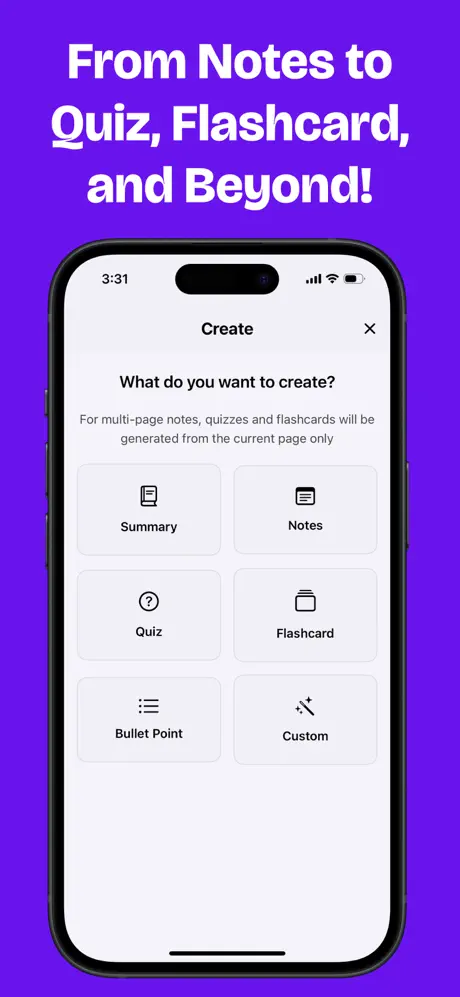
- AI-Powered Transcription: High-accuracy engine that converts live or recorded audio into text within seconds.
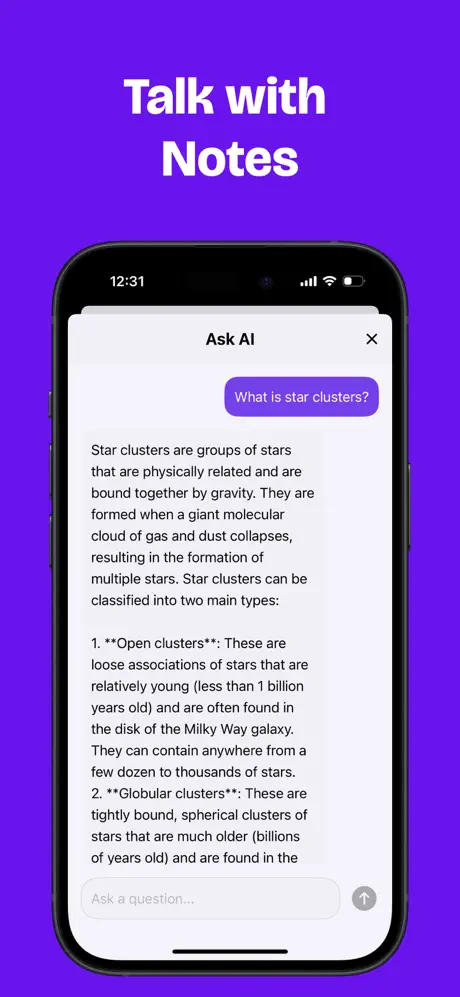
- Smart Summarization: Automatically generates concise summaries to highlight key discussion points and action items.
- Multi-Format Support: Upload various audio and video file formats for processing or record directly within the software.
- Voice Identification: Distinguishes between different speakers to provide a structured and readable transcript.
- Searchable Archives: Indexing functionality that allows users to find specific keywords across all saved transcriptions.
Use Cases
- Academic Lectures: Students can record professors and receive a complete text version of the lesson for easier study and review.
- Corporate Meetings: Project managers can document stakeholder discussions and distribute meeting minutes instantly.
- Media Interviews: Journalists can quickly transcribe recorded interviews for article drafting and fact-checking.
- Personal Voice Memos: Individuals can dictate thoughts or to-do lists on the go and have them converted into organized notes.
Why Choose OtterNotes AI Audio to Text
This tool stands out for its balance of speed and contextual intelligence. While basic recorders only capture sound, this platform adds value by analyzing the content to provide summaries and speaker insights. The primary benefit of using OtterNotes AI Audio to Text is the significant reduction in administrative overhead, enabling a more efficient workflow for anyone managing large amounts of verbal information.
Pros and Cons
Pros
- Efficient real-time processing that saves hours of manual labor.
- Clear and intuitive interface suitable for all technical skill levels.
- High accuracy rates even in environments with moderate background noise.
Cons
- Heavy reliance on a stable internet connection for cloud-based AI processing.
- Technical terminology or strong accents may require minor manual corrections.
Final Verdict
OtterNotes AI Audio to Text is a highly effective productivity tool that simplifies the transition from audio to written data. It is a reliable solution for anyone looking to enhance their documentation accuracy through the power of artificial intelligence.
Ratings & Reviews
Please log in to write a review.
No reviews yet. Be the first to rate!