'%3e%3cpath%20fill='%230CCF60'%20d='M158.25%20175.542c0-29.271%2023.729-53%2053-53h131.375c29.271%200%2053%2023.729%2053%2053v131.023c0%2029.271-23.729%2053-53%2053H211.25c-29.271%200-53-23.729-53-53V175.542Z'/%3e%3cpath%20fill='%23D2DE75'%20d='M158.25%20452.518c0-29.271%2023.729-53%2053-53h131.375c29.271%200%2053%2023.729%2053%2053v131.024c0%2029.271-23.729%2053-53%2053H211.25c-29.271%200-53-23.729-53-53V452.518Z'/%3e%3cpath%20fill='%2315B66A'%20d='M434.875%20175.542c0-29.271%2023.729-53%2053-53H619.25c29.271%200%2053%2023.729%2053%2053v131.023c0%2029.271-23.729%2053-53%2053H487.875c-29.271%200-53-23.729-53-53V175.542Z'/%3e%3cpath%20fill='%23E7A95D'%20d='M434.875%20452.518c0-29.271%2023.729-53%2053-53H619.25c29.271%200%2053%2023.729%2053%2053v131.024c0%2029.271-23.729%2053-53%2053H487.875c-29.271%200-53-23.729-53-53V452.518Z'/%3e%3cpath%20fill='url(%23b)'%20d='M728.088%20123.584C586.142%2039.806%209.186-194.997%204.001%20342.299c-.08%208.242%206.658%2015.349%2014.9%2015.322l81.72-.262c8.736-.028%2015.536-8.148%2015.058-16.87-31.398-572.572%20754.324-133.144%20612.409-216.905Z'/%3e%3c/g%3e%3cdefs%3e%3clinearGradient%20id='b'%20x1='34.575'%20x2='673.419'%20y1='229.473'%20y2='-93.138'%20gradientUnits='userSpaceOnUse'%3e%3cstop%20stop-color='%2328E77B'/%3e%3cstop%20offset='1'%20stop-color='%2315B66A'/%3e%3c/linearGradient%3e%3cfilter%20id='a'%20width='749.251'%20height='644.542'%20x='0'%20y='0'%20color-interpolation-filters='sRGB'%20filterUnits='userSpaceOnUse'%3e%3cfeFlood%20flood-opacity='0'%20result='BackgroundImageFix'/%3e%3cfeColorMatrix%20in='SourceAlpha'%20result='hardAlpha'%20values='0%200%200%200%200%200%200%200%200%200%200%200%200%200%200%200%200%200%20127%200'/%3e%3cfeOffset%20dy='4'/%3e%3cfeGaussianBlur%20stdDeviation='2'/%3e%3cfeComposite%20in2='hardAlpha'%20operator='out'/%3e%3cfeColorMatrix%20values='0%200%200%200%200%200%200%200%200%200%200%200%200%200%200%200%200%200%200.25%200'/%3e%3cfeBlend%20in2='BackgroundImageFix'%20result='effect1_dropShadow_23_251'/%3e%3cfeBlend%20in='SourceGraphic'%20in2='effect1_dropShadow_23_251'%20result='shape'/%3e%3c/filter%3e%3c/defs%3e%3c/svg%3e)




About Photoroom: AI Photo Editor
Learn more about this application's features and capabilities.
Photoroom AI Photo Editor is a professional-grade image processing software designed for e-commerce sellers, small business owners, and content creators. This platform automates the complex process of background removal and studio-quality product photography using advanced machine learning. By eliminating the need for expensive equipment or manual editing skills, the tool allows users to create high-end visual assets for online marketplaces and social media in seconds.
Key Features
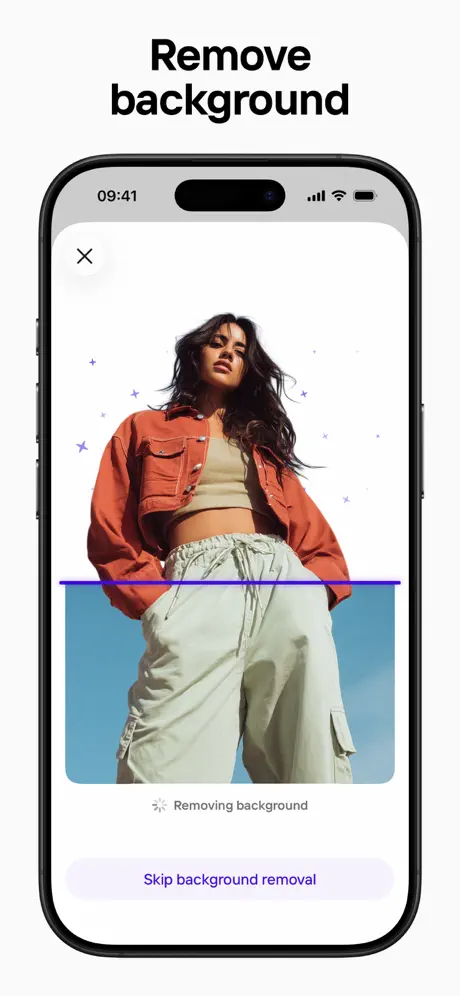
- Automatic Background Removal: Instantly isolate subjects from their surroundings with high-precision edge detection.
- AI Background Generation: Create realistic environments and lighting effects around products using descriptive text prompts.
- Batch Editing: Process dozens of images simultaneously to maintain visual consistency across an entire product catalog.
- Retouching Tools: Remove unwanted objects or imperfections with a simple swipe to ensure a clean final result.
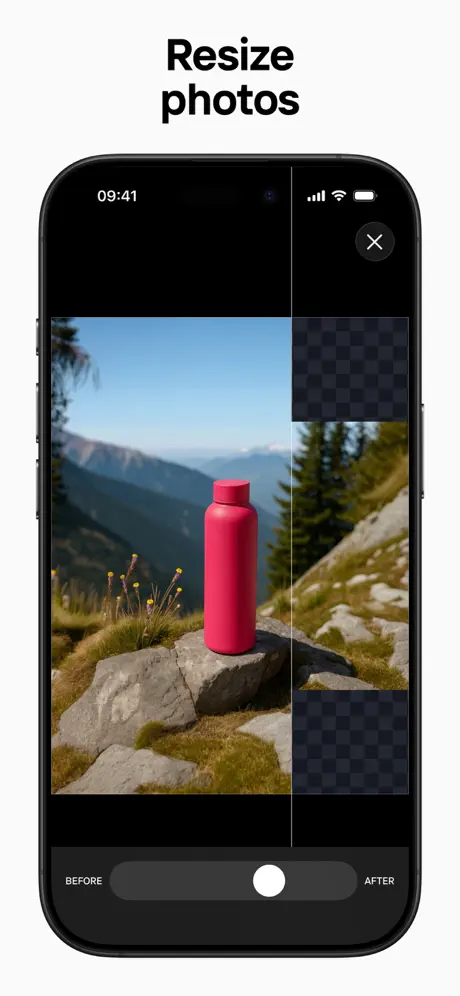
- Smart Resizing: Automatically adjust images to fit the specific requirements of platforms like eBay, Amazon, or Shopify.
Use Cases
- E-commerce Listings: Generate clean, white-background images for online store inventories to improve click-through rates.
- Marketing Materials: Design promotional flyers, posters, and digital ads by layering subjects over creative backgrounds.
- Portrait Enhancement: Create professional headshots or profile pictures for LinkedIn and professional portfolios.
- Inventory Management: Rapidly digitize physical stock into a standardized visual format for internal databases.
Why Choose Photoroom AI Photo Editor
This software provides a significant competitive advantage by reducing production time and costs. The primary benefit of Photoroom AI Photo Editor is its ability to deliver studio-level aesthetics without a studio. It bridges the gap between raw mobile photography and professional graphic design, making it an essential utility for anyone scaling a visual-centric brand.
Pros and Cons
Pros
- Extremely fast processing speeds for complex subject isolation.
- Intuitive interface that simplifies the professional editing workflow.
- High-quality AI-generated backgrounds that look realistic.
Cons
- Requires a stable internet connection for cloud-based AI processing.
- Free version applies a watermark to exported images.
Final Verdict
Photoroom AI Photo Editor is a powerful and efficient solution for high-volume photo editing tasks. It balances automation with creative control, making it a top-tier choice for commercial and personal branding.
Ratings & Reviews
Please log in to write a review.
No reviews yet. Be the first to rate!